
LinkedIn X-Ray search uses Google's site: operator to pull up public LinkedIn profile pages without logging into LinkedIn at all. You get profile URLs and text snippets, not emails or phone numbers, and results reflect whatever Google last indexed rather than live profile updates. Use it for fast, targeted candidate discovery on niche skills or credentials; use Sales Navigator or an AI sourcing platform when you need verified contact data or bulk outreach at scale.
TL;DR:
- Google’s X-Ray search uses cached LinkedIn profiles, providing URLs and snippets but not direct contact information or live profile data.
- Search queries require precise Boolean logic with exclusions to avoid job boards and recruiters, but over-filtering can eliminate promising results.
- LinkedIn's shrinking public profile visibility since 2024 has reduced search effectiveness, especially for city-specific results and current job titles.
- Running multiple targeted searches and verifying profiles manually remain essential because results are often stale or incomplete due to indexing delays.
- X-Ray is best used for rapid candidate identification rather than bulk outreach, which requires verified contact data from specialized tools or platforms.
Table of Contents
- What Is X-Ray Search on LinkedIn and How Does It Work?
- How Do You Run an X-Ray Query and Collect Profiles?
- What Advanced Operators Sharpen an X-Ray Search?
- Why Are X-Ray Results Smaller or Staler Than Expected?
- How Do You Turn X-Ray Results Into a Sourcing Pipeline?
- What Tools Help X-Ray Search Without Crossing a Line?
- Practitioner Tips for Sourcing Technical and Security Roles
- When I Reach for X-Ray vs Other Sourcing Tools
- A Curated Path to Vetted Technical Candidates
- Sources
- FAQ
What Is X-Ray Search on LinkedIn and How Does It Work?
The formula starts with site:linkedin.com/in followed by the job title, skill, or credential you're hunting for. Google searches its cached copy of public LinkedIn profiles and returns anything matching your terms, which means this technique lives entirely outside LinkedIn's own search bar and its usage limits.
Boolean operators do the heavy lifting. Quotation marks lock in exact phrases, OR groups title variants, and a minus sign excludes noise words like "jobs" or "hiring." A query like site:linkedin.com/in "software engineer" "Python" -jobs -intern narrows results to profiles mentioning both terms while filtering out job postings and internship listings that sometimes slip into the index.
Here are copy-paste templates for common recruiting scenarios:
site:linkedin.com/in "product manager" "SaaS" -jobssite:linkedin.com/in "financial analyst" "Excel" "FP&A" -recruitersite:linkedin.com/in "software engineer" "remote" -staffing -agencysite:linkedin.com/in "AWS Certified" "DevOps" -jobssite:linkedin.com/in "data scientist" "Snowflake" OR "Databricks"site:linkedin.com/in "site reliability engineer" "Kubernetes" -internsite:linkedin.com/in "CISSP" "security engineer" -jobs
Swap placeholders one at a time rather than stacking five new filters at once. Every added exclusion or exact phrase shrinks your pool, and over-filtering is the most common reason a promising query returns zero results.
How Do You Run an X-Ray Query and Collect Profiles?
Running a query is mechanical, but refining it well is where sourcing skill actually shows up.
- Paste your string into Google's search bar exactly as written, including quotation marks.
- Scan the first two pages of snippets for role titles, tools, and certifications that confirm relevance, not just keyword matches.
- If results look thin, remove your most specific exclusion first, since a single overly narrow
-wordoften kills an otherwise good query. - If results look bloated with recruiters and job boards, add
-jobs -recruiter -staffingbefore touching anything else. - Open promising profiles in new tabs and copy the URL, headline, and any snippet text that shows relevant projects or tools.
- Log each find in a spreadsheet with columns for name, headline, profile URL, sourcing note, and verification status.
That last column matters more than it looks. Marking a profile "unverified" versus "confirmed active" saves you from chasing a lead who left the company two years ago. X-Ray search works best when you treat it as a discovery funnel, not a finished list.
What Advanced Operators Sharpen an X-Ray Search?
Once the basics feel routine, a few operators cut through noise that basic strings can't touch.
intitle:restricts matches to words appearing in the page title, useful for isolating a specific role when snippets alone are too noisy.inurl:catches vanity URL slugs, which sometimes reveal a company name or username pattern for alumni searches.- Parentheses group title variants so
("full stack engineer" OR "full-stack developer" OR "software engineer")searches all three at once instead of running separate queries. - Exclusion chains like
-jobs -staffing -recruiter -"posted by"clear out job boards and agency listings that clutter results for popular titles. - Company alumni searches combine a former employer name with a target title:
site:linkedin.com/in "Cisco" "network engineer" -jobs.
Pro Tip: Stack one OR group with one exclusion chain per query. Combining multiple OR groups in the same string often confuses Google's parser and returns worse results than two simpler, separate searches.
For multi-skill searches, put your must-have skill in quotes and your nice-to-have skills in an OR group: site:linkedin.com/in "Terraform" ("AWS" OR "Azure" OR "GCP") -jobs.
Why Are X-Ray Results Smaller or Staler Than Expected?
LinkedIn tightened public profile indexing and visibility settings starting in 2024, and that shift is the single biggest reason X-Ray hit rates dropped for many sourcers. Google simply can't cache what LinkedIn no longer exposes publicly, so some profiles that used to surface now don't, regardless of how well the query is written.
A few practical fixes:
- If a snippet looks cut off mid-sentence, click through to confirm the profile still exists rather than assuming the content is gone.
- City-level location terms often fail because LinkedIn's own location data maps to country and region codes rather than exact cities, so search by company or school name instead of a city when local results come back thin.
- Cached snippets can lag current job titles by months, so always verify current employer before reaching out.
- Running more than a handful of rapid, near-identical queries in a short window risks a temporary CAPTCHA block from Google, so space out searches during heavy sourcing sessions.
How Do You Turn X-Ray Results Into a Sourcing Pipeline?
Finding a profile is the easy part. Converting it into an outreach-ready lead takes a few disciplined steps.
- Confirm the role matches your requirement by checking current title, tenure, and any recent activity like posts or comments.
- Cross-check company legitimacy through the company's LinkedIn page or website, especially for smaller or unfamiliar employers.
- Look for public contact clues in the profile's featured section or personal website link before assuming you need a separate enrichment tool.
- Log candidate notes with a clear consent-respecting standard, meaning you record what's publicly visible, not sensitive inferred information.
- Import verified leads into your ATS or CRM using consistent tags so a teammate can pick up the thread without redoing your research.
Pro Tip: Tag each imported lead with the exact boolean string that found them. When a hiring manager asks for "more like this one," you'll have the query ready instead of rebuilding it from memory.
Sourcing guides for 2026 consistently frame X-Ray as a discovery step that still needs verification and enrichment before outreach, not a finished contact list.
What Tools Help X-Ray Search Without Crossing a Line?
Browser bookmarks with pre-built query templates save real time, and a simple CSV export of your spreadsheet log keeps results portable across teams. Manual use of a browser extension that highlights or exports visible profile data is generally fine when it doesn't scrape at volume or bypass rate limits.
- Bookmark folders organized by role type beat rebuilding strings from scratch every session.
- CSV exports from your tracking sheet make handoff to a colleague or ATS import far cleaner than screenshots.
- Full automation, meaning scripts that fire hundreds of queries per hour, invites both Google rate limiting and LinkedIn policy risk.
When your volume need outgrows manual X-Ray, an AI-native sourcing platform with built-in enrichment becomes the more efficient move, particularly as AI adoption in recruiting continues to reshape how teams fill technical roles at scale.
Practitioner Tips for Sourcing Technical and Security Roles
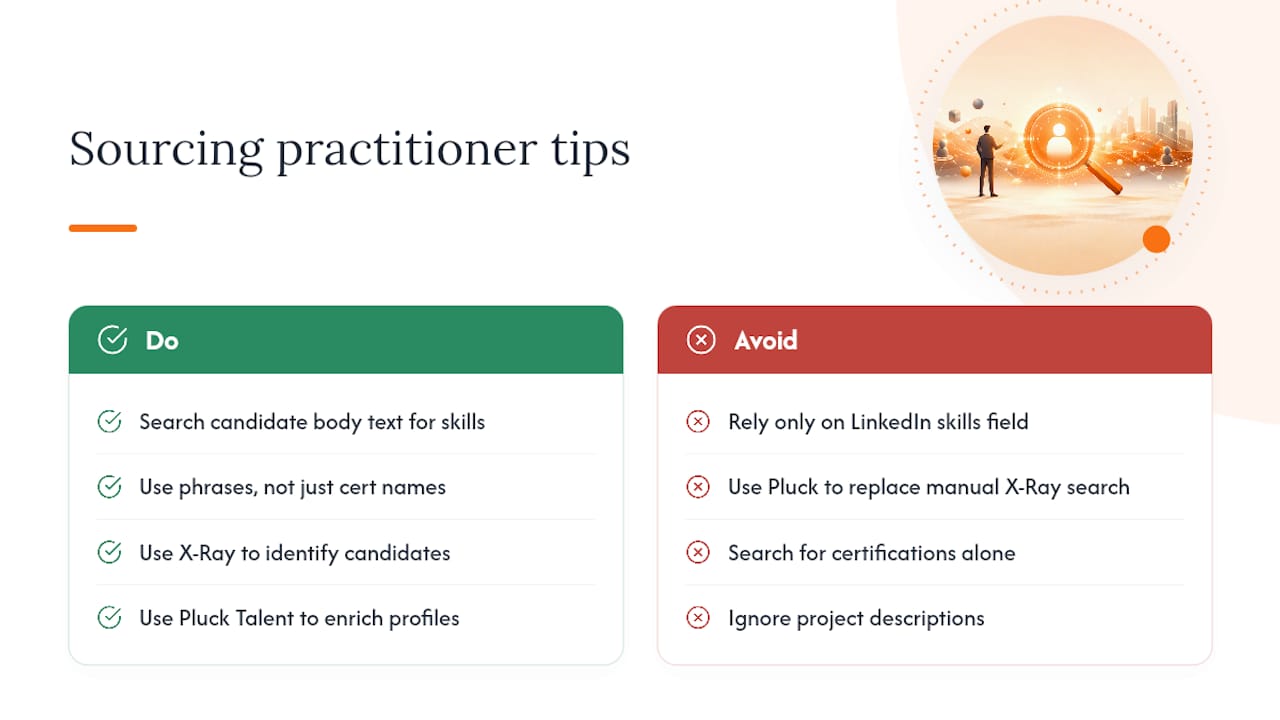
Engineers and security professionals often list their real skills in project descriptions rather than LinkedIn's structured skills section. Target body text with strings like "led migration to Kubernetes" or "built SOC playbooks" instead of just certification names. A tool like Pluck Talent can complement this discovery stage by helping enrich and optimize candidate profiles once you've identified them through X-Ray, without replacing the manual search itself.
When I Reach for X-Ray vs Other Sourcing Tools
X-Ray earns its place when I need a fast read on how many people hold a rare certification or worked at a specific company, before committing budget to a paid seat. It's a pool-sizing tool as much as a sourcing one. Once a search needs verified emails, real-time activity signals, or volume beyond a few dozen strong leads, platform search or an AI-sourcing tool does the job faster and with less manual cleanup. The two approaches aren't competitors so much as different gears for different stages of the same search.
— Diego
A Curated Path to Vetted Technical Candidates
X-Ray gets you a list of names fast, but turning that list into interviews still takes verification, enrichment, and outreach, work that eats hours a recruiter could spend closing roles instead. The platform approaches the same technical talent pool from the other direction: AI matching, resume and profile optimization, and recruiter-vetted placements built specifically for IT and cybersecurity roles.
For sourcers drowning in manual enrichment after a long X-Ray session, platforms can reduce that load by surfacing candidates who are already optimized and ready to move through a pipeline, rather than raw profile URLs needing hours of cleanup. It's worth reading how outreach etiquette shifts once you've identified a hiring manager worth contacting, since the message matters as much as the find. If your team is hiring for IT or cybersecurity positions, visit Pluck Talent's job seekers page to see how recruiter-vetted technical profiles get built, or check the main Pluck Talent site to start a search today.
Sources
- Docs
- Yena
- LinkedIn X‑Ray Search 2026: Find Anyone for Free (La Growth Machine)
- AI in HR — 2025 talent trends (SHRM)
FAQ
What Does "Someone Searched You" Mean on LinkedIn?
It means another member looked up your profile through LinkedIn's own search or viewed it directly. X-Ray search through Google leaves no such trace, since it never touches LinkedIn's search infrastructure at all.
How Do You Do a Deep Search on LinkedIn?
A deep search combines Google's site:linkedin.com/in operator with boolean phrases, exclusions, and OR groups to surface public profiles that LinkedIn's native search might rank lower or hide behind a paywall.
Can Someone Tell if You Viewed Their Profile Using X-Ray?
No. Since X-Ray search happens on Google and never opens the profile page directly until you click through, it doesn't register as a profile view the way LinkedIn's own search does.
How Do You Run a Filtered Search on LinkedIn Without Recruiter?
Google's boolean operators, quotation marks, OR groups, and exclusions act as your filters when you don't have Recruiter seat access, letting you narrow by title, skill, or company through the search string itself.
Does Pluck Talent Replace X-Ray Search?
No. Pluck Talent works alongside discovery methods like X-Ray search by helping optimize candidate profiles and surfacing recruiter-vetted technical talent, rather than replacing the initial sourcing step.