
Write your About in first person, name who you help and the result you deliver in the first sentence, add one quantified metric, name your stack, and close with a plain-text contact line. That structure fits the visible preview LinkedIn shows before the "See more" fold, and it gives recruiters the five signals they scan for in the first three sentences. Everything below shows you exactly how to build it.
TL;DR:
- Including a clearly defined role and a specific measurable achievement in the first three sentences significantly increases recruiter engagement.
- Name your core technologies within a sentence that provides context, rather than listing skills as a separate, unconnected keyword dump.
- Always provide a direct contact method, such as an email, on its own line at the end of your About section, avoiding employer addresses for privacy.
- Use first-person voice to make your profile more authentic and easier to scan, emphasizing concrete details over vague buzzwords or third-person descriptions.
- Keep your About section between 1,500 and 2,200 characters, with a compelling hook in the opening, short paragraphs, and a clear, specific call to action.
Table of Contents
- Role-Specific LinkedIn About Examples for IT
- How Do You Write an IT About Section Step by Step?
- Fix These Common LinkedIn About Mistakes
- How Long Should a LinkedIn About Section Be?
- Five Fillable LinkedIn About Templates
- Why First-Person Voice Changes How Recruiters Read You
- Should You Put Your Email in Your LinkedIn About Section?
- What Makes a Recruiter Actually Click Message?
- A Faster Path From Profile to Interview
- Sources
- FAQ
Role-Specific LinkedIn About Examples for IT
A generic summary blends into a recruiter's feed. A summary that names a stack, a scale, and a number stops the scroll. Below are examples across common IT roles, each built on the same skeleton: hook, proof, context, contact. Swap the bracketed details for your own stack, team size, and metric, and keep the sentence structure intact.
- Junior developer: "I help small product teams ship features faster without breaking things. In my first year at [company], I closed 40+ tickets a sprint across a React and Node stack while cutting my own bug rate in half. I'm looking to grow into a mid-level role on a team that values code review. Reach me at [email]."
- Backend engineer: "I build APIs that hold up under real traffic. Last year I redesigned a payment service on Go and PostgreSQL that cut API latency by 60% and now handles 2 million requests a day. I work best on teams shipping to production weekly, not quarterly. Email: [email]."
- Senior individual contributor: "I'm a staff-level engineer who owns systems end to end, from architecture to on-call. At [company], I led the migration of a monolith to microservices across a team of 12, reducing deployment time from 45 minutes to under 5. Kubernetes, Terraform, and AWS are my daily tools. Open to conversations about principal-track roles: [email]."
- Site reliability engineer: "I keep production up while everyone else sleeps. I run on-call for a fleet of 300+ services and brought our incident MTTR down from 90 minutes to 22 using better alerting and runbooks in Datadog and PagerDuty. I care about blameless postmortems more than heroics. [email]."
- Cloud engineer: "I move workloads to the cloud without the surprise bill. I led an AWS-to-multi-cloud migration for a 50-person engineering org that cut infrastructure spend by 30% while improving uptime to 99.95%. Terraform, Kubernetes, and cost governance are where I add the most value. [email]."
- Cybersecurity specialist: "I find the gaps before attackers do. I run vulnerability assessments and incident response for a mid-market fintech, and my last penetration test engagement helped close 18 critical findings before a compliance audit. CISSP-certified, comfortable in regulated environments. Discreet inquiries: [email]."
- Data engineer: "I build pipelines that data scientists actually trust. I redesigned an ETL pipeline processing 5TB daily on Airflow and Snowflake, cutting failed job rates from 12% to under 1%. I like teams where data quality is a first-class concern. [email]."
- Engineering manager / tech lead: "I grow engineers while shipping product. I lead a team of 8 backend developers and grew our sprint velocity by 35% in a year by fixing our code review bottleneck, not by adding headcount. Python, AWS, and mentoring are where I spend most of my time. [email]."
Notice what stays constant across every example: a first-person hook, one number, a named stack, and a way to reach you that does not depend on LinkedIn's messaging limits. IT profiles that name specific technologies alongside a measurable result consistently read as more credible to hiring managers than summaries that just list skills. To adapt any of these, swap three things only: the stack (your actual tools), the scale (team size, request volume, data volume), and the metric (percentage, time saved, uptime). Everything else in the sentence structure can stay put.
How Do You Write an IT About Section Step by Step?
Most engineers write their About section the way they write commit messages: technically accurate, emotionally flat. Recruiters skim past that in under five seconds. A better formula has four parts, and you can build a working draft in the time it takes to review a pull request.
- Hook. One sentence naming who you help and what result you deliver. Not "Experienced software engineer with 8 years in the industry." Instead: "I help e-commerce teams handle Black Friday traffic without their checkout falling over."
- Proof. One quantified outcome tied to that hook. "Last quarter I re-architected our checkout service to handle 3x peak load with zero downtime."
- Context. Your stack, your scale, your team size, in one or two sentences. "I work primarily in Java and Kubernetes, on a team of 6 supporting 400,000 daily active users."
- CTA. A specific ask and a way to reach you. "I'm interested in senior backend roles at companies scaling past their first million users. Email: [email]."
Try these three micro-exercises, each takes about three minutes:
- Write your hook sentence first, with no qualifiers. Cut every "results-driven" or "passionate about." Say the outcome instead.
- Take one bullet from your resume and rewrite it as a spoken sentence. "Managed CI/CD pipeline" becomes "I cut our deploy time from 40 minutes to 6 by rebuilding our pipeline in GitHub Actions."
- Write your CTA as if you were leaving a voicemail, not filling out a form field. "I'd love to talk to teams working on distributed systems at scale" reads better than "Open to new opportunities."
If you're currently employed and don't want your About section broadcasting a job search to your manager, skip LinkedIn's "Open to Work" banner and use neutral framing in the profile itself, such as "always interested in conversations about distributed systems roles" instead of "actively looking." It signals availability without setting off alarms at your current job.
Pro Tip: Write your hook sentence last, even though it goes first. Draft your proof and context sections, then compress the strongest outcome from them into one punchy opening line.
Fix These Common LinkedIn About Mistakes
Most IT About sections fail for the same handful of reasons, and most of them take under two minutes to fix.
- Mistake: Opening with your job title instead of your impact. Fix: Lead with what you solve, not what your badge says.
- Mistake: Listing skills with no context ("Python, AWS, Docker, Kubernetes"). Fix: Fold each skill into a sentence about what you built with it.
- Mistake: No numbers anywhere in the summary. Fix: Add at least one metric, even an approximate one ("roughly 200,000 users").
- Mistake: Third-person voice ("John is a software engineer who..."). Fix: Switch to first person; it reads as more direct and personal.
- Mistake: No way to contact you outside LinkedIn's messaging system. Fix: Add a personal email on its own line.
- Mistake: A wall of text with no line breaks. Fix: Break every 2 to 3 sentences into its own short paragraph.
- Mistake: Ending with nothing (no CTA, no next step). Fix: Close with one clear sentence about what kind of role or conversation you want.
- Mistake: Overusing buzzwords like "passionate," "dynamic," or "results-oriented." Fix: Replace each with a specific fact that proves the trait instead of naming it.
Before: "Experienced backend developer with strong skills in Java and Spring Boot, passionate about clean code." After: "I build backend services in Java and Spring Boot that stay stable under load.
Before: "Skilled in cloud infrastructure and DevOps practices." After: "I manage AWS infrastructure for a team of 15 engineers, running Terraform-managed environments that deploy 50+ times a week."

If you're job-searching quietly, avoid words like "seeking new opportunities" in your opening line. Save the direct ask for your closing sentence, and phrase it around the kind of work you want rather than the fact that you're looking.
How Long Should a LinkedIn About Section Be?
LinkedIn shows roughly the first 300 characters of your About section before readers have to click "See more," so that opening line carries most of the weight. Put your hook and your single strongest metric inside that window. Everything after it is a bonus for readers who are already interested.
LinkedIn technically allows up to 2,600 characters in the About field, but the practical sweet spot for IT profiles sits between 1,500 and 2,200 characters. That's enough room for a hook, two or three proof points, your stack, and a CTA, without turning into a wall of text nobody finishes.
A few formatting rules make a real difference in how your section gets read:
- Keep paragraphs to 2 to 3 sentences maximum.
- Use a line break before your contact information so it stands out.
- Skip heavy Unicode symbols or bullet characters that render inconsistently across devices.
- Put your role title and core technologies in the first two sentences, not buried at the bottom.
On keyword strategy: LinkedIn's About section is indexed for search inside the platform, so naming your role title and specific technologies in natural sentences (not a stacked keyword list) improves how often you surface in recruiter searches. "I build distributed systems in Go and Kubernetes" does the job better than a comma-separated skills dump at the bottom of your summary, and it reads like a person wrote it.
Five Fillable LinkedIn About Templates
Copy one of these, fill in the brackets, and you have a working draft in under ten minutes. Each template maps to a common situation IT professionals are writing from.
-
Actively job searching, individual contributor. "I'm a [role] who [what you solve]. At [company], I [specific achievement with a number]. My core stack is [technologies]. I'm looking for [type of role] at companies working on [type of problem]. Reach me directly at [email]." Filled example: "I'm a backend engineer who builds APIs that hold up under real traffic. At Fintech Co, I redesigned our payments service and cut latency by 60%. My core stack is Go, PostgreSQL, and AWS. I'm looking for senior backend roles at companies scaling past their first million users. Reach me directly at [email]."
-
Employed, quietly open. "I [what you do and for whom], currently at [company/industry, optional]. Recently, I [achievement]. I work in [stack]. Always open to conversations about [type of work] with teams doing interesting things in [domain]."
-
Career changer into IT. "I moved into [IT specialty] after [previous background], and I bring [transferable strength] to how I approach [technical work]. In my current role, I [concrete project or result]. I'm building depth in [technologies] and looking for [role type]. [email]."
-
Manager or tech lead. "I lead [team size] engineers building [what your team ships]. My focus is [technical or people-management specialty]. Under my leadership, [team metric, e.g., velocity, retention, uptime]. I work in [stack]. Open to [next step, e.g., director-track roles, larger team]. [email]."
-
Cybersecurity or cleared professional. "I [core security function, e.g., 'find vulnerabilities before attackers do'] for [industry type]. Recently, [specific engagement or outcome, keeping details appropriately general if the work is sensitive]. I hold [certification]. Discreet inquiries welcome at [email]."
For every template, keep the opening sentence inside that first 300 character window, and treat your last line as the CTA, not an afterthought. If you need help translating resume bullets into sentences like these, a resume bullet library is a useful cross-reference for the phrasing.
Why First-Person Voice Changes How Recruiters Read You
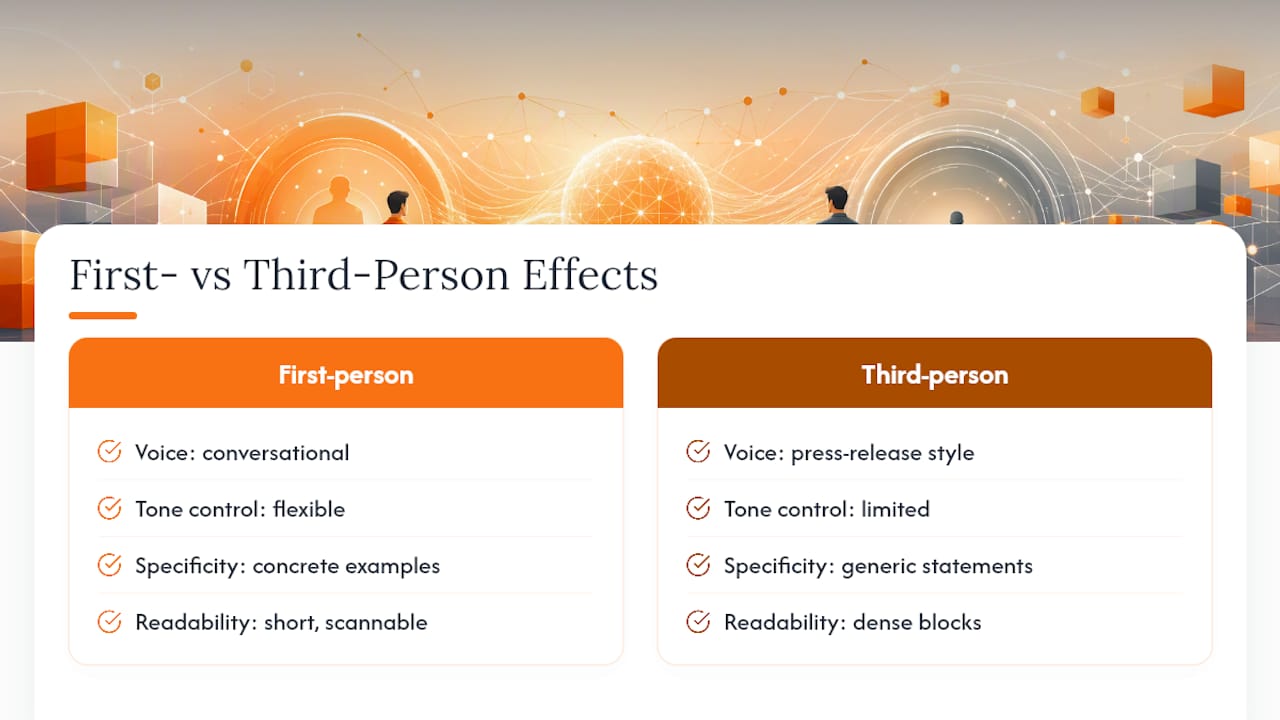
Third-person About sections read like a press release someone else wrote about you. First-person voice reads like you're actually talking to the person scanning your profile, and that shift matters more than it sounds like it should.
Compare "Sarah is a DevOps engineer with 5 years of experience" to "I've spent the last 5 years making deployments boring, in a good way." The second version sounds like a person. The first sounds like a LinkedIn bot generated it, because in a lot of cases, it did.
First-person voice also lets you control tone in a way third-person can't. You can be dry, direct, or a little wry, and it still reads as authentic because it's coming from you, not a narrator describing you. That tone difference is often what separates a summary that gets skimmed from one that gets a reply.
The conversational register works best when it stays grounded in specifics. "I love solving hard problems" is first-person and still forgettable. "I love the moment when a flaky test finally stops flaking" is first-person and memorable, because it's concrete enough that another engineer recognizes it immediately. Short paragraphs and first-person phrasing consistently read as more authentic and easier to scan than dense, third-person blocks, and that readability is worth more than any extra sentence of polish.
Write the way you'd explain your job to another engineer at a meetup, not the way you'd write a performance review. That's the calibration to aim for.
Should You Put Your Email in Your LinkedIn About Section?
Yes, and this is one of the most skipped steps in IT profiles. LinkedIn limits who can message you directly if a recruiter doesn't have Premium or isn't already in your network. A visible contact line removes that barrier entirely.
Put a personal, non-work email on its own line near the end of your About section, after your CTA sentence. Something as simple as "Reach me at [email]" works. Avoid your current employer's email address, both for privacy and because it signals you might be job hunting from company time.
A dedicated contact line specifically helps recruiters who lack messaging privileges reach out without friction, and in practice that's a meaningful share of the recruiters who'd otherwise want to contact you but can't. If you're worried about spam, a separate email created just for job search purposes, or a Google Voice number for phone contact, keeps your main accounts clean.
Your CTA sentence should say what you want, specifically. "Open to opportunities" tells a recruiter nothing actionable. "Looking for senior backend roles at Series B to Series D companies" tells them exactly whether to reach out. Pair that specificity with your contact line, and you've removed both the ambiguity and the platform friction that keep good candidates from getting found.
What Makes a Recruiter Actually Click Message?
Recruiters scan dozens of profiles an hour, and the ones that get a message share a short list of traits, not a long one. Based on what actually drives outreach in technical recruiting, six signals matter most: a clear role or title match, one quantified result, tech stack named in context (not just listed), a visible contact method, a sense of team size or scale, and evidence of a recent project rather than something from five years ago.
Recruiters also weigh how quickly they can confirm fit. A profile that makes them hunt for your stack or guess your seniority gets passed over for one that states it plainly in the first three sentences. That's the whole logic behind leading with a hook and following immediately with proof.
Here's a five-item checklist to run against your own About section before you consider it finished:
- Does the first sentence name your role and the result you deliver?
- Is there at least one number in the first three sentences?
- Is your stack named in a sentence, not dumped as a keyword list?
- Can someone reach you without LinkedIn Premium?
- Does the last sentence say what kind of role or conversation you want?
If you can check all five, your profile is doing the work a good recruiter needs it to do.
— Diego
A Faster Path From Profile to Interview
Writing a strong About section gets you noticed. Getting past the applicant tracking systems and into a hiring manager's inbox is a separate problem, and it's the one Plucktalent was built to solve. Plucktalent pairs Plucky AI, a job search assistant that tailors your resume and profile for specific roles, with direct connections to hiring managers at companies actively hiring for your exact stack, skipping the job board queue entirely.
This approach fits senior individual contributors, cleared cybersecurity professionals, and anyone tired of watching applications disappear with no response. Instead of guessing what a resume screener wants, you get an ATS-ready profile and a warmer path into the pipeline. For a broader look at how AI is changing profile optimization for tech candidates, see Plucktalent's career guide on AI job search tools. If your resume metrics need work before they make it into your About section, Plucktalent's personal branding guide is worth a look too, and JobAlign's profile optimization checklist is a solid supplementary resource if you want another pass at your formatting.
Start on the job seekers page to see how Plucktalent connects your optimized profile directly to hiring managers who are actively looking for your skill set.
Sources
- LinkedIn About Section: How to Write One That Gets You Noticed (2026)
- Maximizing LinkedIn for Software Engineers: A Comprehensive Guide
- LinkedIn Profile Tips for IT Professionals
FAQ
What is a good LinkedIn headline for an IT professional?
A strong headline names your specialty and one outcome or scale detail, such as "Backend Engineer | Go & Kubernetes | Scaled APIs to 2M Daily Requests," rather than just your job title.
What should I write in my LinkedIn About section?
Open with who you help and the result you deliver, add one quantified outcome, name your stack and team size, and close with a specific ask and a contact line, ideally within 1,500 to 2,200 characters.
What is the 3-2-1 rule on LinkedIn?
Definitions of this rule vary across career coaches, and there's no single agreed-upon version specific to About sections, so treat any specific formula you see for it with caution rather than as a fixed standard.
What is the 4-1-1 rule on LinkedIn?
The 4-1-1 rule is a content-sharing guideline, most often applied to posting frequency rather than the About section itself, and it varies enough by source that it's not a reliable formatting standard to build your summary around.
How long should my LinkedIn About section be for an IT role?
Keep your hook inside the first 300 characters, since that's what shows before the "See more" fold, and aim for a total length of 1,500 to 2,200 characters out of LinkedIn's 2,600 character maximum.