
A cold email to a recruiter works best when it names the role, states one clear credential, and ends with a single low-friction ask. Here is a copy-ready starting point:
Subject: Senior Network Engineer open to new roles
Hi [Recruiter First Name],
I'm a Senior Network Engineer with 8 years at [Company Name], specializing in Cisco and cloud infrastructure. I noticed you place candidates in network and infrastructure roles, and I'd welcome a 15-minute call to see if there's a fit. I'm happy to send my resume if helpful.
Best, [Your Name]
Two subject lines to test immediately:
- Senior Cloud Engineer — open to new roles
- Cybersecurity analyst, 6 yrs exp, exploring opportunities
Both stay under eight words, name the role, and signal intent without sounding desperate.
Key Takeaways
A targeted cold email under 150 words, sent to a named recruiter who places your role, is the most direct path to a recruiter conversation outside of a referral.
| Point | Details |
|---|---|
| Subject line rule | Keep it under eight words: role name plus one credential or intent signal. |
| Email anatomy | Use four sentences: personalized opener, credibility signal, role target, single ask. |
| Follow-up limit | Send one follow-up after 5–7 business days, one final nudge after another 5–7 days, then stop. |
| Resume attachment | Offer to send your resume in the body; do not attach it to the initial message. |
| Plucktalent | IT and cybersecurity professionals can use Plucktalent to find recruiter contacts and surface hidden roles before sending outreach. |
Table of Contents
- Why does a cold email to a recruiter actually work?
- How do you find the right recruiter's contact information?
- What should every cold outreach email include?
- What subject lines get a recruiter to open your email?
- Cold email templates for the most common scenarios
- What is the right follow-up cadence after a cold email?
- Should you attach your resume to the first email?
- What mistakes reduce recruiter reply rates?
- Pre-send checklist: what to verify before you hit send
- Why personalization outperforms mass outreach
- Why addressing the recruiter by name matters
- How to A/B test subject lines to improve open rates
- How to adapt tone and formality by industry and recruiter type
- What recruiters actually need to place you quickly
- Plucktalent speeds up what cold emailing does manually
- Sources
- FAQ
Why does a cold email to a recruiter actually work?
Cold outreach earns replies when it targets the right person. A recruiter who places network engineers every week has an immediate reason to read a message from a qualified network engineer. That specificity is what separates a reply from a delete.
LinkedIn Hiring Lab research on recruiter activity shows that hiring volume concentrates in specific functions and industries at any given time. Matching your outreach to a recruiter's active specialty puts your message in front of someone who can act on it now.
When cold email is the right move:
- An internal recruiter at a target company is actively hiring for your function
- An agency recruiter specializes in your technical domain (IT, cybersecurity, cloud)
- A role is posted but you want to reach the recruiter before the inbox fills up
- No posted role exists, but the company is publicly growing in your area
When it is not the right move:
- You have a warm referral — use it instead
- You are sending the same message to 50 recruiters without changing a word
- The recruiter's LinkedIn profile shows no activity in your specialty
Pro Tip: Send on Tuesday, Wednesday, or Thursday between 9 and 11 a.m. in the recruiter's time zone. CareerScribeAI's timing research shows recruiters are in active sourcing mode during those windows, which marginally increases open and reply rates.
How do you find the right recruiter's contact information?
The most reliable approach is to find a named person, not a generic inbox. TailorCV's guidance confirms that a short, specific note to a real person consistently outperforms messages sent to careers@ or info@ addresses.
Step-by-step to find the right contact:
- Read the job post. Many list a recruiter's name or a hiring manager's title.
- Search LinkedIn using the company name plus titles like "Technical Recruiter," "IT Recruiter," or "Talent Acquisition."
- Check the company's careers page for a recruiter contact or a team directory.
- Search staffing agency directories if you are targeting an agency recruiter in your specialty.
- Ask a mutual connection for a direct introduction or a name.
Verifying the email address:
- Most companies follow a standard format: firstname.lastname@company.com or firstinitiallastname@company.com
- Tools like Hunter.io or Rocket Reach surface common formats for a given domain
- Check the recruiter's LinkedIn activity: recent posts or job shares confirm they are actively sourcing
Pro Tip: Before sending, look at the recruiter's recent LinkedIn posts or shared roles. If their last activity was six months ago, they may have moved on. Confirm they are still active before investing time in a tailored message. Plucktalent's AI-powered contact discovery explains how automated tools can surface and verify recruiter emails at scale.
What should every cold outreach email include?
Indeed's recruiter outreach guide recommends a direct subject line, a salutation by name, a concise summary of experience, and a single clear next step. That four-part structure keeps the message under 100 words and readable in 30 seconds.
The four components:
- Personalized opener: Reference something specific — a role they posted, a client sector they serve, or a recent company announcement. One sentence.
- Credibility signal: Name your current or most recent employer, a measurable result, or a relevant certification. One sentence.
- What you are looking for: State the role type and any constraint (location, remote, contract vs. full-time). One sentence.
- Single ask: Request a 15-minute call or permission to send a resume. One sentence.
NextCV's framework adds that recruiters prioritize messages that make them look efficient to their clients. Relevance, evidence of placeability, and a single easy next step are the three signals that move a message from "maybe later" to "reply now."
Tone guidance: Match formality to the industry. A message to a financial services recruiter reads more formally than one to a startup tech recruiter. More on this in the tone section below.
Pro Tip: Do not attach your resume to the initial message unless the job post explicitly requests it. Offer to send it instead. Unsolicited attachments trigger spam filters and add friction before the recruiter has decided you are worth their time.
What subject lines get a recruiter to open your email?
AscendurePro's cold email guidance sets a clear rule: keep the subject under eight words, open with a targeted reason, and pair a role with a credential or intent signal.
Four subject-line formulas:
[Role] — [years] exp, open to [location/remote][Role] at [Current/Recent Company] — exploring opportunitiesRe: [Job Title] posting — [one credential][Certification or skill] + [Role] — available [timeframe]
12 ready-to-use subject lines:
- Senior DevOps Engineer — open to remote roles
- Cloud Architect, AWS certified, exploring 2026 opportunities
- Re: SOC Analyst posting — 5 yrs SIEM experience
- Cybersecurity analyst available Q3 — CISSP certified
- IT Project Manager, PMP, open to contract work
- Full-stack developer — 7 yrs, fintech background
- Network Engineer — Cisco CCNP, open to relocation
- Re: Infrastructure Lead role — 10 yrs enterprise exp
- Penetration tester — OSCP, available immediately
- Data Engineer, Snowflake/dbt, exploring senior roles
- IT Director — open to healthcare sector opportunities
- Cloud Security Engineer — GCP/Azure, open to new roles
Keep subject lines factual. Avoid clickbait phrases like "Urgent" or "You won't want to miss this." Recruiters see hundreds of messages; a plain, specific subject line reads as professional, not lazy.
Cold email templates for the most common scenarios
Pick the scenario that matches your situation, then swap the bracketed fields.
1. You found a posted role but did not apply yet
Subject: Re: [Job Title] posting — [credential]
Hi [First Name],
I saw the [Job Title] role posted on [Platform] and wanted to reach out directly. I'm currently a [Your Title] at [Company], with [X years] focused on [relevant skill]. I'd welcome a quick call to discuss whether my background fits what you're looking for. Happy to send my resume if useful.
Best, [Your Name]
Customization notes:
- Swap [Platform] for LinkedIn, Indeed, or the company site
- Replace [relevant skill] with the top technical requirement from the posting
- If you have a measurable result (reduced downtime by 30%), add it to the credibility line
2. Agency recruiter in your specialty, no specific role in mind
Subject: [Role] — [years] exp, open to [location]
Hi [First Name],
I came across your profile and noticed you place candidates in [specialty area]. I'm a [Your Title] with [X years] at [Company], currently open to [role type] opportunities in [location/remote]. Would a 15-minute call make sense to see if there's a fit in your current pipeline?
Best, [Your Name]
Customization notes:
- Confirm the recruiter's specialty on LinkedIn before sending
- Name a specific client sector they serve if you can find it ("I see you work with financial services firms")
- Keep the ask to one question, not two
3. Internal recruiter at a target company
Subject: [Role] interest — [credential], [Company Name]
Hi [First Name],
I've been following [Company Name]'s work in [product area or recent news] and am interested in [Role] opportunities on your team. I'm currently a [Your Title] at [Current Company], with [X years] in [relevant domain]. I'd appreciate a brief call to learn more about open or upcoming roles.
Best, [Your Name]
Customization notes:
- Reference a specific product launch, funding round, or team expansion to show genuine interest
- Avoid "I've always dreamed of working here" — keep it factual
- If a role is not posted, say "open or upcoming" rather than assuming a vacancy exists
4. Career switcher moving into a new technical domain
Subject: [Target Role] — [transferable credential], open to entry-level
Hi [First Name],
I'm transitioning into [Target Domain] from [Current Domain], where I spent [X years] at [Company] doing [transferable skill]. I recently completed [relevant certification or bootcamp] and am targeting [role type] positions. Would you have 10 minutes to discuss whether my background could fit any of your current searches?
Best, [Your Name]
Customization notes:
- Lead with the transferable skill, not the career change itself
- Name the certification prominently — it is your credibility signal
- Set a realistic ask: "entry-level" or "junior" signals self-awareness
Pro Tip: Read the cold outreach job search overview on Plucktalent's blog for additional sample emails tailored to IT and cybersecurity professionals.
What is the right follow-up cadence after a cold email?
NextCV's follow-up guidance is direct: wait 5–7 business days, send one short follow-up, then send one final nudge after another 5–7 business days. More than two follow-ups is discouraged.
Follow-up template 1 (first follow-up, email):
Hi [First Name], I wanted to follow up on my note from last week about [role/specialty]. I'm still very interested and happy to send my resume if that would help. Let me know if a quick call works.
Best, [Your Name]
Follow-up template 2 (final check-in):
Hi [First Name], I'll keep this brief — I wanted to check in one last time about [role/specialty]. If the timing isn't right, no worries at all. I'd welcome the chance to connect when something relevant comes up.
Best, [Your Name]
After a positive reply, respond within 24 hours and have your resume ready to send. CareerScribeAI's follow-up framework maps trigger events to recommended wait times and channel choices, which is useful for building a consistent cadence across multiple outreach threads.
Should you attach your resume to the first email?
The short answer: offer it, do not attach it. Indeed's recruiter outreach guidance recommends offering to send materials as a next step rather than leading with an attachment.
Best practices for attachments and links:
- Offer your resume in the body ("Happy to send my resume") rather than attaching it to the cold email
- If a job post explicitly requests a resume with initial contact, attach it as a PDF
- Name files clearly:
FirstName_LastName_Resume_2026.pdf— neverresume_final_v3.pdf - For a portfolio or GitHub repo, include a single hyperlink in the body, not multiple links
- Keep portfolio links to one page or one repo that is directly relevant to the role
Sending a large attachment to a recruiter who has not yet expressed interest adds friction and can trigger spam filters. Once the recruiter replies, send the resume immediately.
What mistakes reduce recruiter reply rates?
NextCV's recruiter outreach framework and LinkedIn Pulse commentary on cold recruiter emails both point to the same pattern: generic, long, or vague messages get deleted.
Common mistakes and one-line fixes:
- Generic subject line — Fix: name the role and one credential in the subject
- Email over 150 words — Fix: cut to 3–4 sentences; every word must earn its place
- Vague ask ("I'd love to connect") — Fix: request a specific action ("15-minute call" or "permission to send resume")
- No personalization — Fix: reference the recruiter's specialty, a posted role, or a client sector
- Attaching resume immediately — Fix: offer to send it instead
- Following up more than twice — Fix: two follow-ups maximum, then stop
- Sending to a generic inbox — Fix: find a named recruiter; a careers@ address rarely reaches a decision-maker
Avoid common job search time wasters like mass-blasting the same template to 40 recruiters. Ten targeted messages outperform 100 generic ones.
Pre-send checklist: what to verify before you hit send
- Right person: Confirmed the recruiter places your role or works at your target company
- Subject line: Under eight words, names the role, no clickbait
- Correct name and title: Recruiter's first name spelled correctly in the salutation
- 30-second readability: The email reads cleanly in one pass, no jargon
- Credibility signal present: One specific employer, result, or certification named
- Single ask: One CTA only — call, reply, or permission to send resume
- Offer to send resume: Stated in the body, no unsolicited attachment
- Working links: Any portfolio or LinkedIn URL opens correctly
- Signature: Name, phone number, LinkedIn URL
- Word count: Under 150 words
Send Tuesday through Thursday, 9–11 a.m. in the recruiter's time zone. If the message earns a reply, save it as a template for future outreach.
Why personalization outperforms mass outreach
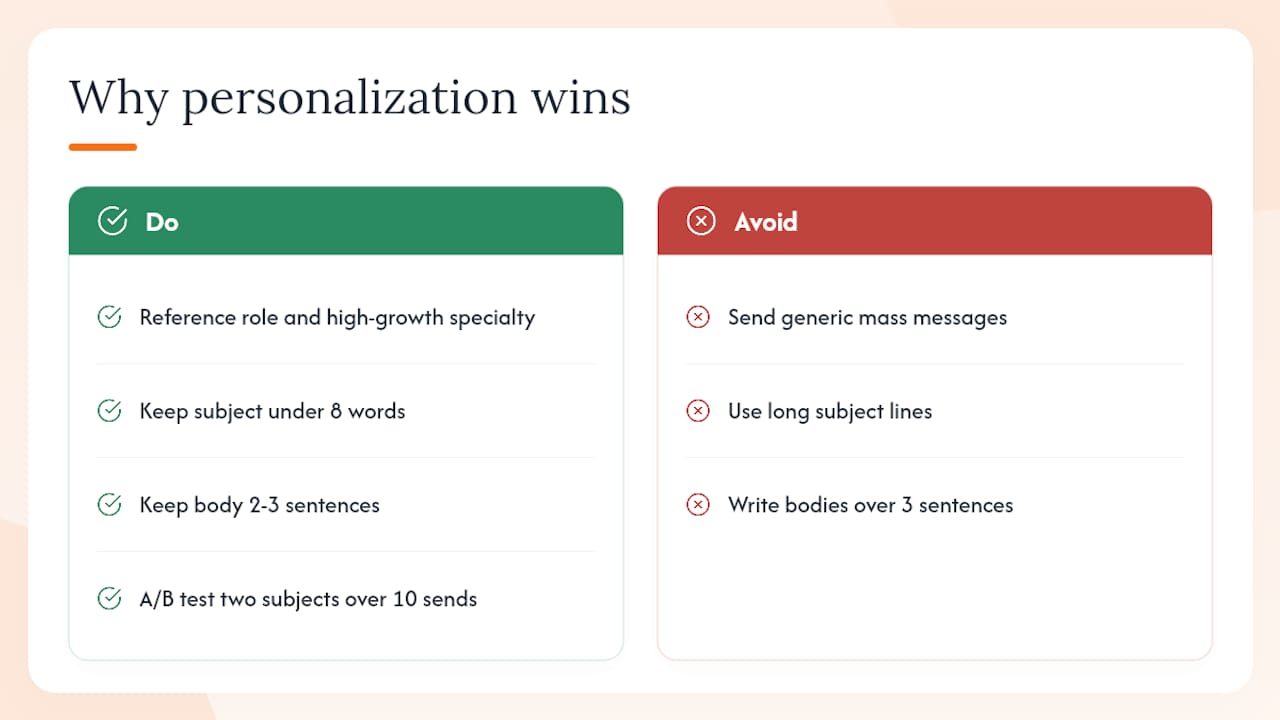
Targeted, relevant outreach earns more recruiter attention than generic mass messages. The U.S. Bureau of Labor Statistics Occupational Outlook Handbook provides occupation-level hiring projections that help identify which roles are in high demand — referencing a high-growth specialty in your outreach signals that you understand the market the recruiter is working in.
LinkedIn Hiring Lab research on hiring trends shows that recruiter activity concentrates in specific functions during defined periods. A message that references the recruiter's active specialty, a recent role they posted, or a client sector they serve demonstrates awareness that a form letter cannot replicate.
Stat to know: AscendurePro's cold email analysis finds that keeping the subject under eight words and the body to 2–3 sentences — both markers of a targeted, recruiter-centric message — are the two structural choices most correlated with higher reply rates.
One practical test: write two subject lines for the same role (one generic, one with a specific credential or company name) and track which version earns more replies over 10 sends. That small A/B experiment produces usable data without requiring a large sample.
Pro Tip: Check the Occupational Outlook Handbook before writing your outreach. If your specialty shows strong projected growth, mention it. A recruiter placing cloud security engineers knows demand is rising; a candidate who references that context reads as informed.
Why addressing the recruiter by name matters

Using the recruiter's first name in the salutation is not a courtesy — it is a signal that the message was written for them specifically. A "Hi there" or "Dear Hiring Team" opener tells the recruiter immediately that the message is a broadcast.
Find the name on the job post, the company's LinkedIn page, or the recruiter's own profile. If you cannot find a first name, use the full name ("Hi Jordan Smith") rather than a generic greeting. Avoid "Dear Sir/Madam" entirely; it reads as outdated and impersonal in U.S. recruiting contexts.
Personalization extends beyond the name. Referencing a role the recruiter recently posted, a client sector they serve, or a company announcement shows that you spent two minutes on research. That two-minute investment is visible in the message and separates it from every form letter in the recruiter's inbox.
How to A/B test subject lines to improve open rates
A/B testing a subject line does not require a large sample. Send version A to the first five recruiters on your list and version B to the next five, keeping everything else identical. Track which version generates more replies over two weeks.
Variables worth testing one at a time:
- Role name only vs. role name plus credential
- Years of experience included vs. omitted
- "Open to new roles" vs. a specific location or work arrangement
Change one variable per test. Changing two at once makes it impossible to know which element drove the difference. After 10–15 sends, the pattern becomes clear enough to standardize on the better-performing version.
Avoid subject lines that mimic marketing emails ("Quick question for you" or "Following up on something important"). Recruiters recognize those patterns and the message reads as a template, not a targeted outreach.
How to adapt tone and formality by industry and recruiter type
A message to an internal recruiter at a Fortune 500 financial services firm reads differently than one to an agency recruiter at a startup-focused tech staffing firm. The structure stays the same; the register shifts.
By recruiter type:
- Internal recruiter, large enterprise: Formal salutation, full sentences, conservative vocabulary. Avoid slang or casual contractions.
- Agency recruiter, tech specialty: Slightly less formal. First-name salutation, direct language, technical terms are appropriate if they match the recruiter's listed specialty.
- Startup or early-stage company: Conversational but still concise. A brief mention of why you find the company's work interesting reads as genuine rather than performative.
By industry:
- Financial services, legal, healthcare: Formal register, no abbreviations, full job titles
- IT, cybersecurity, cloud: Technical terms are expected; acronyms (CISSP, AWS, CCNP) are appropriate in the subject line and body
- Creative, media, marketing: Slightly warmer tone is acceptable, but brevity still applies
The role of the hiring manager in IT recruiting also shapes how a recruiter reads your message. In technical domains, recruiters often screen for domain-specific vocabulary before forwarding a candidate to a hiring manager. Using the right terminology signals that you can hold a technical conversation.
What recruiters actually need to place you quickly
A recruiter's job is to present candidates their clients will interview. The faster a recruiter can assess fit, the more likely they are to act on a message. Three things make that assessment fast: a clear role target, a recent relevant employer or achievement, and a stated availability.
The four signals recruiters scan for:
- Clear role: One specific title or function, not "open to anything in tech"
- Recent relevant company or achievement: A recognizable employer or a measurable result from the last three years
- Availability: "Available in 30 days" or "actively looking" tells the recruiter whether you fit an urgent search
- Compensation range: Optional in the initial message, but stating a range prevents wasted calls
Present all four in one sentence if possible: "I'm a Senior Cloud Security Engineer at [Company], CISSP certified, available in 30 days, and targeting roles in the $160K–$185K range." That sentence gives a recruiter everything needed to decide whether to forward your profile to a client.
Plucktalent speeds up what cold emailing does manually
Cold emailing a recruiter works. It takes time to find the right contact, tailor each message, and track replies across a dozen threads. Plucktalent is built for IT and cybersecurity professionals who want that process to move faster.
The platform combines 17 years of IT recruiting expertise with Plucky AI to surface hiring manager contact information, tailor resume language to specific roles, and surface roles that never reach public job boards. For candidates in cloud, infrastructure, and cybersecurity, that means fewer cold emails sent to the wrong person and more conversations with hiring managers who are actively searching for their skill set.
Three ways Plucktalent complements direct outreach: it identifies the right recruiter or hiring manager contact before you write a word, it tailors your resume to the role's language so your credibility signal lands harder, and it surfaces hidden roles that make your outreach timely rather than speculative.
IT and cybersecurity professionals who want direct access to hiring managers and vetted role matches can explore Plucktalent's job-seeker platform or review the full services overview to see which option fits their search.
Sources
Key external sources used for the guidance and templates in this article:
- U.S. Bureau of Labor Statistics - Occupational Outlook Handbook
- LinkedIn Hiring Lab
- How to Send an Email to a Recruiter — Indeed Career Guide
- How to Reach Out to Recruiters: Messages That Get Responses — NextCV Blog
- How to Write a Cold Email to a Recruiter and Actually Get a Real Reply | AscendurePro
- Follow-Up Email Templates for Job Applications (2026)
- How to Follow Up After a Job Application (Templates for 2026) | TailorCV Blog
FAQ
How long should a cold email to a recruiter be?
Keep it under 150 words. AscendurePro recommends a subject under eight words and a body of 2–3 sentences with one clear CTA.
When should you follow up after a cold recruiter email?
Wait 5–7 business days before the first follow-up, then send one final nudge after another 5–7 business days. NextCV advises against sending more than two follow-ups total.
Should you email a recruiter directly or apply through the job posting?
Both can work, but a direct email to a named recruiter reaches a decision-maker faster than an application that enters an ATS queue. TailorCV confirms that a specific note to a real person outperforms messages sent to generic inboxes.
What is the best subject line for a cold email to a recruiter?
Name the role and one credential or intent signal in under eight words. Examples: "Senior Cloud Engineer — open to new roles" or "Cybersecurity analyst, CISSP, exploring opportunities."
Can Plucktalent help IT professionals find recruiter contacts?
Plucktalent's platform surfaces hiring manager and recruiter contact information for IT and cybersecurity professionals, reducing the manual research required before sending outreach. Visit Plucktalent for details.