Use a single-column, reverse-chronological layout with standard section headings and web-safe fonts. Save it as a .docx file, or a true text-based PDF if the posting requires one, and run the copy-paste test before you submit. That combination clears the applicant tracking system and lands your resume in front of an actual recruiter.
TL;DR:
- Single-column, straightforward layout with standard section headings and web-safe fonts is essential for ATS parsing success.
- Avoid multi-column formats, tables, text boxes, headers, and graphics that can cause key information to be skipped or misread.
- Save your resume as a .docx file or a text-based PDF, and verify its readability with copy-paste and highlight tests before submitting.
- Incorporate precise keywords from the job posting and lead with action-oriented bullets that highlight results for better ATS and recruiter recognition.
- Testing your resume with simple checks and adjusting for common formatting mistakes can prevent rejection before a recruiter ever sees it.
Table of Contents
- What Is an ATS-Friendly Resume Format, and Why Does It Matter?
- Exact ATS Formatting Checklist (Margins, Fonts, Headings, Bullets, Dates)
- Should You Save Your Resume as a Word Doc or PDF?
- Common Formatting Mistakes That Break ATS Parsing
- How Do You Test if Your Resume Is ATS-Friendly?
- Using Templates Without Breaking ATS Compatibility
- Recruiter-Backed ATS Fixes Pluck Talent Recommends for Tech Resumes
- What Bad Formatting Looks Like From a Recruiter's Chair
- How Pluck Talent Handles ATS Formatting So You Don't Have To
- Sources
- FAQ
What Is an ATS-Friendly Resume Format, and Why Does It Matter?
An applicant tracking system doesn't read your resume the way a hiring manager does. It parses it, breaking the document into fields: name, job titles, dates, employers, skills. Each field gets stored in a database and matched against the job posting's keywords. A single-column layout with standard section headings helps the parser place your information into the correct field the first time.
This is where good design and good parsing pull in opposite directions. A two-column layout might look sharp to a person scanning it for six seconds, but many ATS platforms read left to right across the whole page, stitching your columns into one jumbled stream. Job titles end up next to the wrong dates. Skills land in the summary field. For applicant tracking system resume formatting, parseability comes first. Polish comes second, and only after the machine can read the thing at all.
Exact ATS Formatting Checklist (Margins, Fonts, Headings, Bullets, Dates)
Building an ATS compliant resume layout is mostly a matter of following a short, specific list rather than guessing at what "clean" means. Here's the checklist recruiters and parsing tools consistently point to:
- Layout: single column, no sidebars, no multi-column sections.
- Margins: 0.5 to 1 inch on all sides.
- Fonts: stick to one or two web-safe families, like Arial, Calibri, Helvetica, Georgia, or Times New Roman.
- Font size: 10 to 12pt for body text, 14 to 16pt for headings.
- Section headings: use the standard labels: Contact, Summary, Work Experience, Education, Skills, and Certifications or Projects if relevant.
- Dates: inline and consistent, formatted as "Mon YYYY – Mon YYYY," placed on the same line as the role.
- Bullets: plain round bullets (•), 3 to 5 per recent role, each running 8 to 24 words.
- File name: firstname-lastname-resume.pdf or .docx, never "Resume_Final_v3."
- Contact info: in the body of the page, top section, never in a header or footer.
Pro Tip: Recruiters at MIT's career office frame this simply: when in doubt, boring wins. A plain layout that parses correctly beats a creative one that doesn't get through.
Should You Save Your Resume as a Word Doc or PDF?
File type trips up more candidates than font choice ever does. Here's the rule to follow:
- Default to .docx unless the job posting specifically asks for a PDF.
- If you must use PDF, make sure it's text-based, not a scanned image. A text-based file preserves selectable, machine-readable text, while a scanned or image-based PDF is invisible to most parsers.
- Verify it: open your PDF and try to highlight a sentence. If the text selects normally, you're fine. If nothing highlights, or the whole page selects as one image, regenerate the file, either export a new text-based PDF from Word or send the .docx instead.
This thirty-second check catches one of the most common, and most invisible, reasons a strong resume gets rejected before a person ever sees it.
Common Formatting Mistakes That Break ATS Parsing
Most parsing failures trace back to a small handful of repeat offenders. Fix these and you've solved the majority of ATS compliant resume layout problems before they start.
- Two-column templates and sidebars. Left and right columns often get interleaved into one scrambled stream, mixing job titles with the wrong dates. Convert to single column and re-run the copy-paste test.
- Tables and text boxes. Content inside a table cell or text box frequently gets skipped entirely. Move everything into normal paragraphs or bullet lists.
- Headers, footers, images, icons, logos, and skill bars. These visual touches, contact info in a header, a "Python: 90%" skill bar, are often invisible to parsers. Replace them with plain text placed in the body.
- Decorative fonts and unusual glyphs. Arrows, stars, and script fonts can render as blank characters or broken symbols. Switch to a web-safe font and a plain bullet point.
Pro Tip: If you inherited a resume template from a friend or downloaded one from a design site, assume it has at least one of these problems until you've tested it yourself.
For a closer look at how these mistakes play out specifically on technical resumes, see why IT resumes get rejected and how to fix each cause.
How Do You Test if Your Resume Is ATS-Friendly?
Three quick checks, run in this order, will tell you almost everything you need to know:
- Copy-paste test. Select all the text in your resume and paste it into Notepad or a plain text editor. If the sections come out in the same linear order you wrote them, with nothing missing, you're in good shape. If job titles and dates come out jumbled, your layout needs work.
- Highlight test. If you're submitting a PDF, try to select and highlight a line of text. No highlight means no readable text.
- Keyword sanity check. Scan your resume against the job description. Confirm the required skills and job-title language actually appear, and double-check that your dates and contact information are present and legible.
Run these three tests before every submission, not just once when you first build the resume.
Using Templates Without Breaking ATS Compatibility
Templates from Word, Google Docs, or Canva aren't automatically off-limits, but most weren't built with parsing in mind. Before you commit to one, check it for the usual red flags:
- Open it and look for multi-column sections, text boxes, or a sidebar holding your contact info or skills.
- Check the header and footer for anything essential, since that content often gets dropped entirely.
- Look for icons, skill bars, or colored graphic elements standing in for text.
If the template has one or two of these issues, you can often fix it: flatten the columns into one, delete the icons and retype the labels as plain text, and move your contact details into the top of the body. If it's built entirely around a graphic sidebar or heavy visual design, don't fight it, start from a plain single-column Word document instead. For safer starting points, these resume template ideas stick to layouts built to parse cleanly from the outset.
Recruiter-Backed ATS Fixes Pluck Talent Recommends for Tech Resumes
Format gets you through the parser. Content gets you the interview. IT and cybersecurity recruiters consistently flag two habits that separate resumes that land calls from ones that don't. First, use the exact job-term phrases from the posting, "Kubernetes orchestration," not "container management experience," since ATS keyword matching rewards precision over paraphrase. Second, structure bullets to lead with the action and close with the result: what you built, what changed because of it.
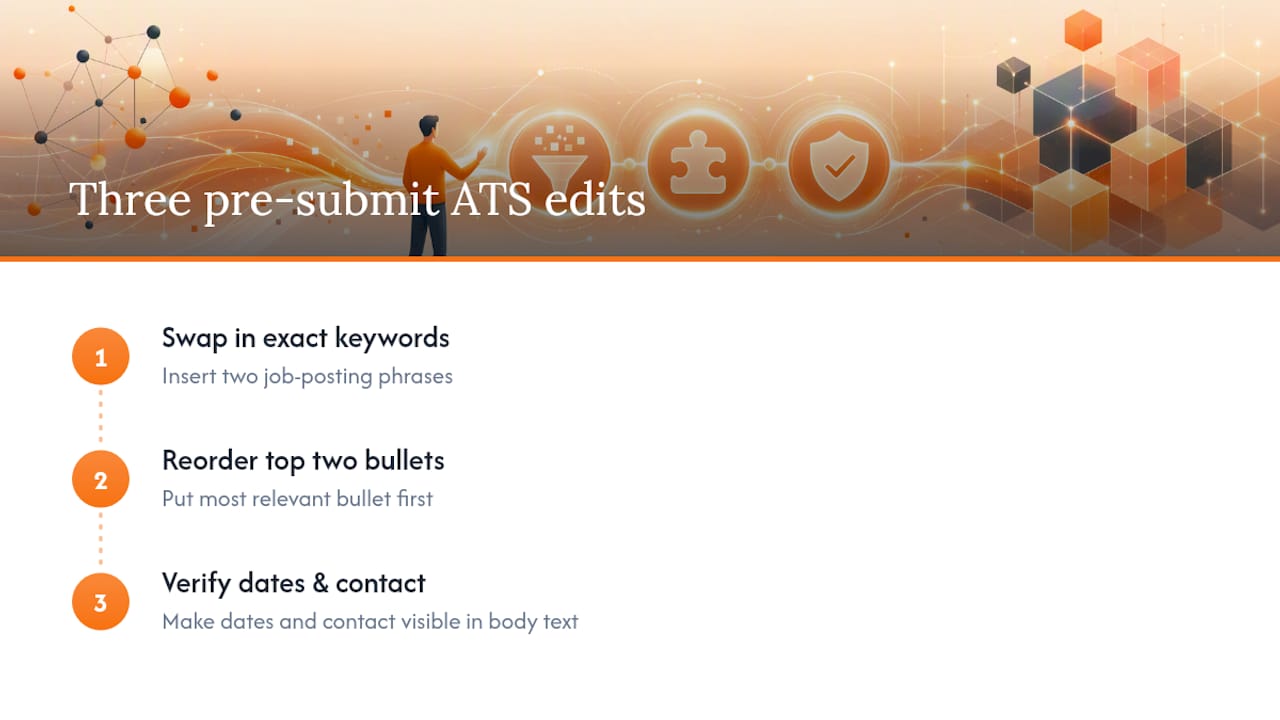
Pro Tip: Before you submit, spend ten to fifteen minutes on three edits: swap in two keywords straight from the job posting, reorder your top two experience bullets so the most relevant one leads, and confirm your dates and contact info are visible in the body text. For more on building out that language, see this guide to using exact job terms in your skills section.
What Bad Formatting Looks Like From a Recruiter's Chair
Watching a strong candidate's resume get flagged as incomplete by a parser, when the actual document is fine, is one of the more frustrating patterns in recruiting. The skills are there. The experience is there. The formatting just hid it. A resume doesn't need to be memorable to work. It needs to be readable, first by a machine, then by the person deciding whether to call you.
— Diego
How Pluck Talent Handles ATS Formatting So You Don't Have To
Most job seekers rebuild the same resume five different ways trying to guess what one ATS wants versus another. Some platforms offer resume review alongside AI tools to help ensure the layout, keywords, and bullet structure work for both the parser and the hiring manager reading it next.
Instead of submitting into a job board's void, Pluck Talent connects your tailored resume directly to hiring managers actively looking for your exact skill set, cutting out the noise of generic applications. If you want a second set of eyes on your resume's structure and sample bullets before you submit it anywhere else, start with the job seekers page to see how the resume tailoring and recruiter review process works for IT and cybersecurity roles.
Sources
For further verification, see MIT's Career Advising resume guidance, the ATS-friendly format checklist, and this structured document formatting reference.
- Make your resume* ATS-friendly – Career Advising & Professional Development | MIT
- Resume Format for ATS: ATS-Friendly Format Checklist (2026)
- ATS Resume Format: The Complete 2026 Guide | ResumePulse AI
FAQ
What Is the ATS Format for a Resume?
It's a single-column, reverse-chronological layout with standard section headings, web-safe fonts, and inline dates, saved as a .docx file or a text-based PDF with no tables, columns, or graphics.
Is 80% a Good ATS Score?
ATS "match scores" vary widely by platform and aren't standardized, so no single number applies universally. Focus instead on the fundamentals: clean single-column formatting, exact keyword matches from the job posting, and a passed copy-paste test.
Can ATS Detect a ChatGPT-Written Resume?
Most applicant tracking systems parse formatting and keywords rather than analyzing writing style, so they aren't built to flag AI-generated text. Human recruiters reviewing the resume afterward are far more likely to notice generic or repetitive phrasing.
How Do I Convert My Resume to ATS Format?
Strip out tables, columns, text boxes, and graphics, move your contact information into the body, switch to a standard font, and use conventional headings like Work Experience and Skills. Then run the copy-paste test to confirm everything parses in the right order before you save it as a .docx or text-based PDF.