
Your IT skills section should be a short, scannable, job-tailored list of exact technical terms and certifications, grouped by category and backed by proof in your experience bullets. The single best next action: pull the literal skill names out of the job posting and reorder your list so those terms sit at the top. Do that and you get past applicant tracking systems and give recruiters a scannable case for the interview.
TL;DR:
- Listing specific tools and certifications at the top of your resume increases ATS visibility and shows clear relevance to the job.
- Reorder and tailor your skills list to mirror the exact keywords and phrases from the job posting, emphasizing the most critical skills first.
- Back up skills with measurable experience bullets that detail what tools you used, what actions you performed, and the results achieved.
- Keep your skills list between 10 and 25 items, focusing on recent and relevant tools, and avoid including outdated or unverifiable entries.
- Regularly update your skills section to reflect current tools and roles, removing obsolete skills and adding new ones that align with your career progression.
Table of Contents
- What Belongs in an IT Skills Section?
- How Should You Format and Place Your Skills Section?
- How Do You Tailor Your Skills to Each Job Description?
- How Do You Prove Skills in Your Experience Bullets?
- What Do Sample Skills Blocks Look Like for Different IT Roles?
- What Mistakes Make a Skills Section Fall Flat?
- What Recruiters Actually Test For in an IT Skills Section
- How Do You Update Your Skills Section as Your Career Grows?
- What Recruiters Actually See When You Skip the Tailoring Step
- Get Your IT Resume Tailored by People Who Read Hundreds of Them
- Sources
- FAQ
What Belongs in an IT Skills Section?
Technical skills are the specific languages, platforms, cloud services, and tools you've actually used: Python, AWS EC2, Cisco routing, SQL Server, Splunk. Soft skills like "communication" or "leadership" only earn a place if they show up as examples elsewhere, ideally with numbers attached. A skills section listing "teamwork" in isolation tells a recruiter nothing.
Certifications deserve a visible spot, especially active ones from CompTIA, Microsoft, or AWS. List the version when it matters (CompTIA Security+ SY0701, not just "Security+") since some job postings filter by exact cert code. Skip anything you can't speak to in an interview.
Defensible entries versus filler:
- Defensible: "AWS EC2, S3, Lambda" (names real services you've configured)
- Defensible: "PowerShell scripting" (specific, verifiable, easy to demonstrate)
- Filler: "Microsoft Office" (assumed baseline for nearly every office job)
- Filler: "Problem solver" (a soft skill with no supporting evidence anywhere)
- Filler: "Familiar with various programming languages" (vague, unquantified, ATS-invisible)
How Should You Format and Place Your Skills Section?
Place the skills section near the top of the resume for technical roles, right after a two or three line summary. Recruiters scanning dozens of resumes a day look for it before they read a single bullet.
Group entries under plain-text labels rather than one long comma-separated block:
- Languages: Python, Java, SQL
- Cloud/Infra: AWS EC2, Azure VMs, Terraform
- Tools: Jira, ServiceNow, Splunk
- Security: SIEM, IAM, firewall configuration
- Certifications: CompTIA Security+, AWS Certified Solutions Architect
Aim for 10 to 30 total skills, with at least half technical for any IT role. Too few looks thin. Too many, especially past 25, reads like a keyword dump that hurts readability more than it helps to match. Keep the formatting flat: no icons, no graphical proficiency bars, no multi-column layouts. Testing on ATS parsers shows graphical elements like skill bars get misread or dropped by roughly 30% of parsing systems, which can silently erase skills you worked hard to list.
Pro Tip: If a job posting names a specific tool version (Kubernetes 1.28, .NET 6), include that exact version in your list. It's a small detail, but it's also a literal string some ATS filters search for directly.
How Do You Tailor Your Skills to Each Job Description?
Matching a resume to a posting isn't guesswork. It's a three-step extraction process you can finish in under fifteen minutes per application.
- Extract the JD's exact keywords. Copy the job posting into a document and highlight every named tool, platform, and skill phrase. Note the precise wording used.
- Match those terms to your real experience. Only keep terms you can genuinely back up. Don't add "Kubernetes" because it's trending if you've never touched a cluster.
- Reorder your list so top JD terms lead. Put the five to seven skills the posting emphasizes most at the top of their category groups.
Literal phrasing carries real weight here. If a posting says "AWS EC2" and your resume says "cloud computing," that's a mismatch to a literal-match ATS parser. Exact strings beat synonyms, and synonyms only help as a secondary layer inside your experience bullets, according to ATS-behavior research from resume optimization testing.
Resist the urge to cram in every term you found. Prioritize the top five to seven and be ready to defend each one with a specific bullet. A tool like Arvo's job description matching guidance walks through this same extraction logic if you want a second framework to cross-check against.
How Do You Prove Skills in Your Experience Bullets?
A skills section without proof is just a list of claims. The fix is a simple formula: system + action + measurable outcome. Name the specific tool or environment, state what you did with it, and close with a number.
A few examples of that formula in practice:
- "Administered Cisco routing across 40 branch offices, reducing outage tickets by 22% over six months."
- "Migrated legacy SQL Server workloads to AWS RDS, cutting query latency by 35%."
- "Automated patch deployment with PowerShell, saving an estimated 15 hours per week of manual work."
- "Resolved 60+ help desk tickets weekly while maintaining a 95% first-contact resolution rate."
No formal job history yet? Home lab projects, internships, and certification labs work the same way. "Built a home lab simulating a three-tier network with pfSense and VLANs" is a legitimate bullet if you can walk through it in an interview.
Pro Tip: Recruiters skim skills sections in seconds but read experience bullets closely. If a skill in your list doesn't appear again as proof somewhere in your work history, expect a recruiter to quietly discount it.
What Do Sample Skills Blocks Look Like for Different IT Roles?
The right groupings shift depending on the role. A developer's list looks nothing like a security analyst's, and treating them the same is a common way resumes fall flat.
Software Developer Languages: Python, Java, JavaScript, TypeScript. Frameworks: React, Django, Spring Boot. Tools: Git, Docker, Jenkins. Databases: PostgreSQL, MongoDB.
DevOps/SRE Cloud: AWS EC2, S3, Lambda, Azure VMs. Infrastructure as Code: Terraform, Ansible. Containers: Docker, Kubernetes. Monitoring: Prometheus, Grafana, Datadog.
Sysadmin/Help Desk Systems: Windows Server, Active Directory, Linux. Ticketing: ServiceNow, Zendesk. Networking: TCP/IP, DNS, DHCP. Support: remote desktop tools, Office 365 administration.
Security Analyst Security tools: SIEM, IDS/IPS, Splunk. Frameworks: NIST, ISO 27001. Certifications: CompTIA Security+, CISSP. Access: IAM, MFA implementation.
Each block runs 10 to 18 skills. Name specific service versions where the posting does, and always tailor the order before submitting. The help desk resume examples on Plucktalent's blog show how this looks fully built out with ATS keywords included.
What Mistakes Make a Skills Section Fall Flat?
A handful of errors show up again and again, and every one is fixable in ten minutes.
- Mixing soft and hard skills in one list. "Python, teamwork, SQL" confuses both the ATS parser and the human reading it. Separate them, or drop the unproven soft skills entirely.
- Listing outdated or unverifiable items. If you haven't touched Flash or a retired framework in five years, it doesn't belong.
- Using graphics or multi-column layouts. These consistently break ATS parsing and can strip your skills section down to nothing.
- Overstuffing past 25 items. Long, undifferentiated lists read as padding rather than expertise, and they're hard for a recruiter to scan quickly.
What Recruiters Actually Test For in an IT Skills Section
Hiring managers reviewing IT resumes look first for hands-on troubleshooting, networking fundamentals, OS administration, and ticketing experience, not a generic list of buzzwords. That pattern holds across most role-specific hiring guidance, and it's why proof matters more than volume.
A practical checklist for tightening your skills section before you submit anything:
- Extract the exact keywords from the job description.
- Pick your top seven and confirm you can speak to each in an interview.
- Proof each one with a specific, numbers-backed bullet elsewhere on the resume.
Plucktalent's strong tech resume examples and resume template library walk through this same checklist with real formatting you can adapt directly.
How Do You Update Your Skills Section as Your Career Grows?
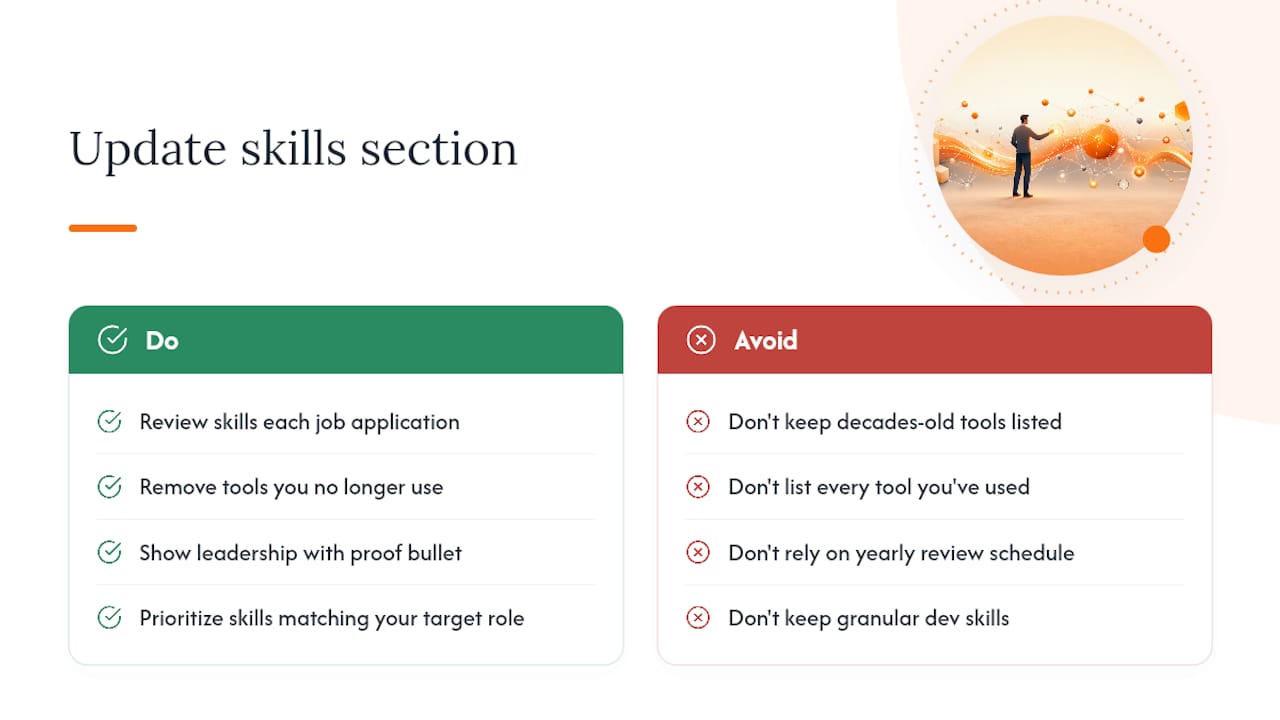
A skills section built for your first help desk job shouldn't still be on your resume five years later, yet plenty of IT professionals let it stay frozen while their actual work evolves. Review it every time you apply to a new role, not once a year on some arbitrary schedule.
Drop tools you no longer use professionally, even if you were once strong with them. Listing Windows XP administration on a 2026 resume signals stagnation more than depth. Replace retired tools with what you're actively working in now, and move older certifications to a secondary line once newer ones supersede them.
As you move from individual contributor toward a lead or management track, your skills section needs to shift too. An early-career sysadmin lists "Active Directory, DNS, DHCP." A senior sysadmin moving toward infrastructure lead adds "team leadership of a 4-person support desk" or "vendor management" alongside the technical core, always paired with a bullet that proves it. A developer moving into an architect role trims some of the granular language-specific skills and adds system design, cross-team technical leadership, and the specific scale of systems they've owned.
The instinct to keep every skill you've ever had is understandable, but it works against you. A resume that lists fifteen years of accumulated tools looks unfocused next to one that shows a clear trajectory. Keep the skills that match where you're headed, not just where you've been, and let older, less relevant technical skills fade out the same way old job entries eventually do.
What Recruiters Actually See When You Skip the Tailoring Step
Conventional resume advice treats the skills section like a formality: pack in a broad list, hope something matches, move on. That approach fails IT candidates specifically because technical hiring runs on literal-match filtering more than most other fields. A recruiter searching an applicant tracking system for "Terraform" doesn't find you if your resume says "infrastructure automation tools."
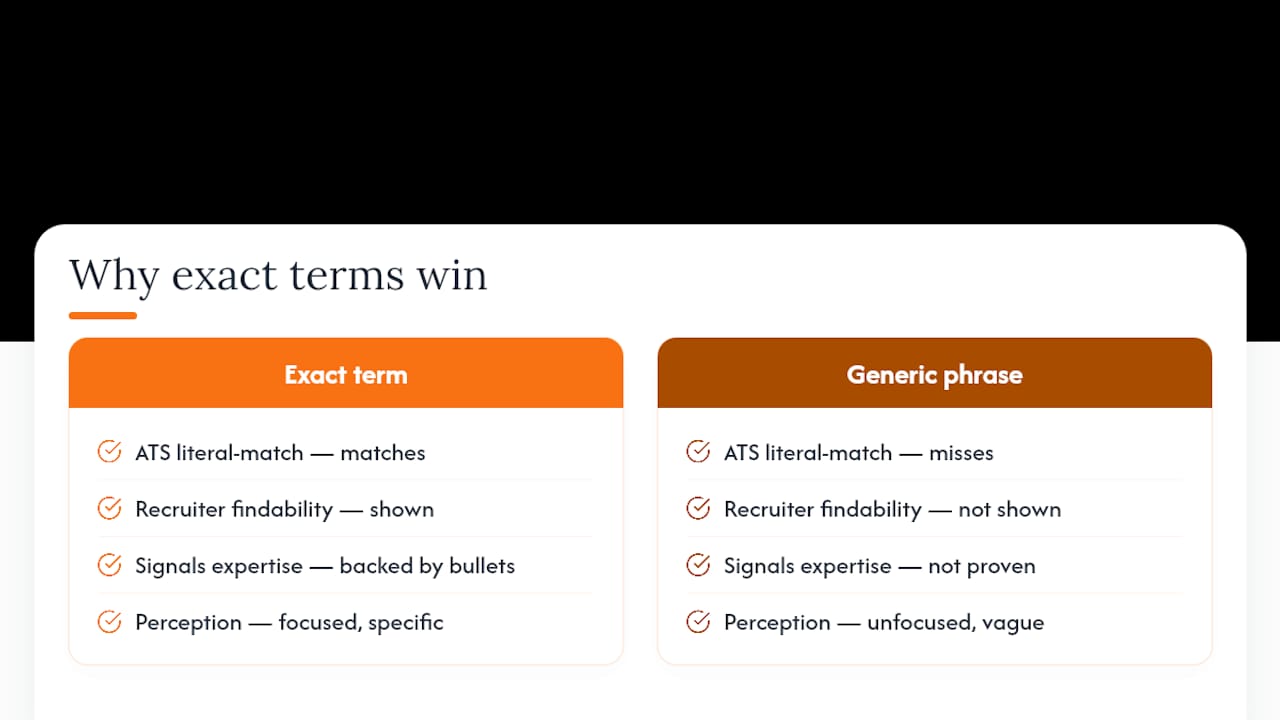
What's overrated is volume. Candidates assume a longer list signals broader expertise, but a 30-item skills dump reads as unfocused, and it invites a recruiter to ask which five of those you'd actually survive an interview about. What's underrated is the direct line between a skill you list and a bullet that proves it. Most resumes fail not because the skills are wrong but because nothing in the experience section backs them up.
Prioritize the extraction step first: read the posting, pull the exact terms, and reorder before anything else. Everything else, formatting, grouping, certification placement, matters less than getting that first move right. Recruiters and ATS parsers alike reward specificity over breadth, every time.
— Diego
Get Your IT Resume Tailored by People Who Read Hundreds of Them
Everything above works better and faster when someone who reads IT resumes for a living builds it with you instead of for a generic template. Plucktalent pairs AI-driven resume tailoring with real recruiting expertise focused specifically on IT and cybersecurity roles, so your skills section gets matched against the exact job posting you're targeting, not a generic keyword list.
The platform builds an ATS-ready, tailored profile and connects you directly with hiring managers actively looking for your specific skill set, cutting out the black hole of generic job board applications. If you're an IT or cybersecurity professional who wants faster interview access instead of another round of guessing which keywords matter, start with Plucktalent's job seeker platform and see your tailored skills section built around a role you actually want.
Sources
For grounding on skill counts and grouping, see Coursera's resume skills guidance. For ATS parsing behavior, see technical skills and keyword matching research. For role context, see the BLS occupational outlook for IT.
- How to Feature Key Skills on Your Resume
- Technical skills are the largest source of ATS keyword matches on a modern resume
- IT Resume Skills: What to List (with Examples, 2026)
FAQ
What Are the Most Important IT Skills for a Resume?
Networking fundamentals, OS administration, cloud platforms (AWS, Azure), scripting, and ticketing tool experience top most hiring managers' lists, alongside relevant certifications like CompTIA or AWS credentials.
What Skills Should I Put on My IT Resume?
List 10 to 30 skills split between technical tools you've used and soft skills you can prove elsewhere, prioritizing whatever the job description names explicitly.
What Are the Top 10 IT Skills Employers Look For?
Networking, cloud platforms, scripting (Python or PowerShell), database management, cybersecurity fundamentals, systems administration, virtualization, ticketing systems, IAM, and troubleshooting consistently rank highest across job postings.
What Are Basic IT Skills for Entry-Level Roles?
Basic IT skills include OS administration (Windows and Linux), help desk ticketing tools, fundamental networking (TCP/IP, DNS), Active Directory basics, and one entry-level certification like CompTIA A+.
How Many Skills Should I List on an IT Resume?
Keep it between 10 and 30, with at least half technical for IT roles. Going past 25 tends to read as a keyword dump rather than genuine expertise.