
The fastest way to find hiring manager names is to try three tactics in order: read the job posting for hidden clues, triangulate on LinkedIn using the company's People tab and the job poster's profile, and call the company's main line to ask directly. Each method takes minutes, and together they solve most searches.
- Job posting clues: signatures, "you will report to," or "meet the team" sections often name the manager.
- LinkedIn triangulation: filter the People tab by department and title, then cross-check who posted the job.
- Phone verification: front-desk staff will often name or connect you to the hiring manager for a specific role when asked politely.
Verify the email before you send anything. A wrong guess at a name or address burns your one shot at a first impression, and it can also flag your message as spam before a human ever reads it.
TL;DR:
- Rereading the job posting for signatures, reporting lines, or contact names often reveals the hiring manager's identity before any search.
- Filtering LinkedIn's People tab by department and title, along with checking who shared the post, provides reliable clues to find the right contact quickly.
- Confirming email patterns through company sources and verifying addresses with known employees reduces bounce rates and increases outreach effectiveness.
- Short, targeted messages referencing specific details from the job post outperform longer, generic outreach when trying to establish contact.
- Using professional communities, press releases, and organizational charts can supplement search efforts, especially when direct contacts are not publicly available.
Table of Contents
- How to Find Hiring Manager Names Step by Step
- How Do You Verify a Hiring Manager's Email?
- What Should Your First Message to a Hiring Manager Say?
- What If You Can't Find the Hiring Manager's Name?
- What Recruiter Experience Says About Finding Hiring Managers Faster
- Where Industry Forums and Associations Fit In
- Using Press Releases and Public Filings to Find Leadership
- Boolean Search Tricks That Narrow Your Results
- Reading the Org Chart to Guess Who's Hiring
- Key Takeaways
- What This Playbook Gets Right (and What Most Advice Misses)
- Skip the Manual Search With Plucktalent
- Sources
- FAQ
How to Find Hiring Manager Names Step by Step
Most job seekers give up after one Google search. That's a mistake, because the answer is usually sitting in plain sight across five or six places you haven't checked yet. Work through these in order. Each one takes a few minutes, and you can often stop as soon as one produces a name.
- Reread the job posting slowly. Look for phrases like "you will report to," "our team is led by," or a name buried in a signature line at the bottom of the description. Some postings even list a direct contact for questions, which is often the actual hiring manager rather than a recruiter.
- Search LinkedIn's People tab. Go to the company page, click "People," and filter by department (Engineering, Security, Product) and seniority (Manager, Director, Head of). For a cybersecurity analyst role, try searching "Security Team Lead" or "SOC Manager" plus the company name directly in LinkedIn's search bar.
- Check who posted the job on LinkedIn. If the listing was shared by an individual rather than a company account, that person is frequently the hiring manager or works one step removed from them. This single clue often reveals the person you're trying to find without any further digging.
- Scan the company's website. Team pages, "About Us" sections, and leadership bios list titles that map to departments. A "Head of Platform Engineering" is a strong bet for who owns a platform engineer opening.
- Call the main switchboard. Ask the receptionist or automated directory for "the hiring manager for the [job title] role" rather than a name you don't have. Front-desk staff are used to this question and will often connect you or provide the name outright.
- Tap your network. Search LinkedIn for alumni from your school or former coworkers who now work at the target company. A short message asking "Do you know who's hiring for the DevOps role posted last week?" costs you nothing and often gets a fast answer.
- Trace the original posting. If you found the job on a board like Indeed or ZipRecruiter, search the exact job title and company on the company's own careers page. The original listing sometimes includes contact details the aggregator stripped out.
Because hiring manager titles usually match the function they're hiring for, an "Engineering Manager" title almost always owns engineering reqs, and a "Head of Product" owns product roles. That mapping is what makes steps 2 and 4 work so reliably.
- Search string to try on LinkedIn:
"[Company Name]" "Engineering Manager"or"[Company Name]" "Security Team Lead". - If the company is small, check for a founder or director title instead of a mid-level manager, since smaller teams flatten the hierarchy.
- Cross-reference any name you find against the job's posting date. A manager who left six months ago is a dead end.
Pro Tip: For IT and cybersecurity roles specifically, search functional titles like "Head of Security," "SOC Manager," or "Platform Engineering Lead" alongside the company name. These titles are consistently tied to hiring authority in tech orgs, which narrows your LinkedIn search dramatically faster than a generic "manager" query.
How Do You Verify a Hiring Manager's Email?
Once you have a name, the next job is turning it into a working email address without guessing blind. Most companies use a predictable format: first.last@company.com, flast@company.com, or just firstname@company.com. You can often confirm the pattern by looking at a press release, a company blog post byline, or an email address already listed on the "Contact Us" page.
- Search the company domain plus "email format" to see if the pattern has been documented publicly.
- Use an email-finder tool to generate likely candidates, then cross-check the result against the person's LinkedIn profile to confirm the name spelling matches exactly.
- Run the address through a free email verification service before sending anything, since many finder tools return addresses that bounce.
- Watch for red flags: a disposable domain, a name that doesn't match the LinkedIn profile, or a pattern that contradicts every other employee's address you've found.
Skip sending until you've confirmed the pattern against at least two known employees. One data point can be a coincidence; two is a pattern. If the address still looks uncertain, a short, low-pressure LinkedIn message is a safer first move than an email that might bounce or land in spam.
What Should Your First Message to a Hiring Manager Say?
Keep it short. A hiring manager scanning a crowded inbox will read the first two lines and decide whether to continue, so front-load the reason you're writing and what you bring.
Structure that works:
- Opener (one line): Name the role and reference your application. "I applied for the Senior DevOps Engineer role posted last week and wanted to introduce myself directly."
- Value pitch (two lines): Connect one specific skill to a result. "I spent three years automating CI/CD pipelines at [Company], cutting deployment time by half. I think that experience lines up well with the infrastructure work your team is scaling."
- The ask (one line): Make it small and specific. "Would you be open to a 10 minute call this week, or could you point me to who's leading the technical screen?"
- Send email first if you have a verified address and the role is senior; it feels more formal and less transactional.
- Send LinkedIn first if you're not fully sure of the email or want to establish a lighter, lower-pressure connection.
- When in doubt, send both, spaced a day apart. Redundancy here reads as diligence, not desperation.
Follow up after three to five business days if you hear nothing. Don't repeat the same message. Shift the angle slightly, maybe sharing a relevant project link or asking a more specific question about the team's current priorities.
Pro Tip: A short, specific message that names the role and asks one direct question consistently outperforms a long, generic cover letter attached to a cold LinkedIn note. Hiring managers respond to signals that you did homework, not to length.
What If You Can't Find the Hiring Manager's Name?
Sometimes the trail goes cold. The company is too large, the org chart is opaque, or the job was posted by a third-party recruiter who won't share details. That doesn't mean personalization is off the table.
- Address your message to the team or function instead of a person: "Dear Cybersecurity Hiring Team" reads far better than "To Whom It May Concern."
- Reference a specific detail from the posting in your opening sentence, like a named tool, certification, or project scope, so it's obvious you read it closely rather than mass-applying.
- Attach a one-page portfolio or a 60 to 90 second video pitch focused on the exact skills the posting lists, since this level of specificity can lift response rates even without a named recipient.
- A polite follow-up call is appropriate about a week after applying. Ask simply whether the role is still open and whether there's someone you should follow up with directly.
What Recruiter Experience Says About Finding Hiring Managers Faster
The gap between a generic application and a targeted one usually comes down to a single data point: a name. Recruiters who've filled thousands of IT and cybersecurity roles know that candidates who reach the actual hiring manager clear the pipeline faster than those stuck in an applicant tracking queue.
Plucktalent built its AI and recruiter-backed platform around that exact gap, pairing 17 years of technical recruiting experience with automated hiring manager discovery so candidates skip the guesswork described above.
Where Industry Forums and Associations Fit In
Professional communities are an underused shortcut, especially in tight technical fields where everyone seems to know everyone. Cybersecurity has associations like ISACA and (ISC)², along with active Slack and Discord communities built around specific tools or certifications. IT operations and DevOps have similar hubs on Reddit, Stack Overflow's community spaces, and vendor-specific user groups.

These spaces work because members talk openly about who's hiring and who runs the team. A quick post asking "Does anyone know who leads the security engineering team at [Company]?" in a niche Slack channel often gets a faster, more accurate answer than an hour of LinkedIn searching, because the people there have firsthand context.
Association directories can also help directly. Many professional bodies maintain member lists searchable by employer, which occasionally surfaces the exact person you're looking for if they're active in the organization. Even when it doesn't produce a name outright, it usually narrows the search to two or three plausible candidates whose titles you can then confirm on LinkedIn.
Local chapters matter too. A regional ISACA meetup or a cybersecurity meetup group often has organizers who work at target companies or know people who do. Attending even one event, virtual or in person, builds the kind of casual familiarity that makes a cold outreach message land as a warm one instead.
Using Press Releases and Public Filings to Find Leadership
Company news is a quiet goldmine for names and titles that job postings never mention. When a company announces a new product launch, a funding round, or a leadership hire, the press release almost always names the executives overseeing that function. A company that just announced a Series C round and a new "VP of Engineering" has effectively told you who now owns hiring decisions for that department.

Search the company name alongside terms like "announces," "appoints," or "promotes" to surface recent leadership news. Business news sites and the company's own press page are the two most reliable sources. For publicly traded companies, annual reports and SEC filings sometimes list senior leadership by name and function, particularly for larger organizations where executive changes are material enough to disclose.
Company blogs are another overlooked source. Engineering and security teams at tech companies frequently publish technical posts under an author's name and title, an "Engineering Manager" or "Head of Security" writing about a recent incident response or architecture decision. That byline alone can hand you both the name and the confirmation that the person is currently in the role, which solves two problems the job posting alone couldn't.
Combine this with a basic timeline check. If the press release naming a "Director of Cloud Infrastructure" is from eighteen months ago, verify on LinkedIn that the person is still there before you build an entire outreach strategy around a name that may no longer be accurate.
Boolean Search Tricks That Narrow Your Results
Typing a company name into Google or LinkedIn and scrolling through pages of loosely related results wastes time. Boolean operators fix that by forcing the search engine to return only what matches your exact criteria.
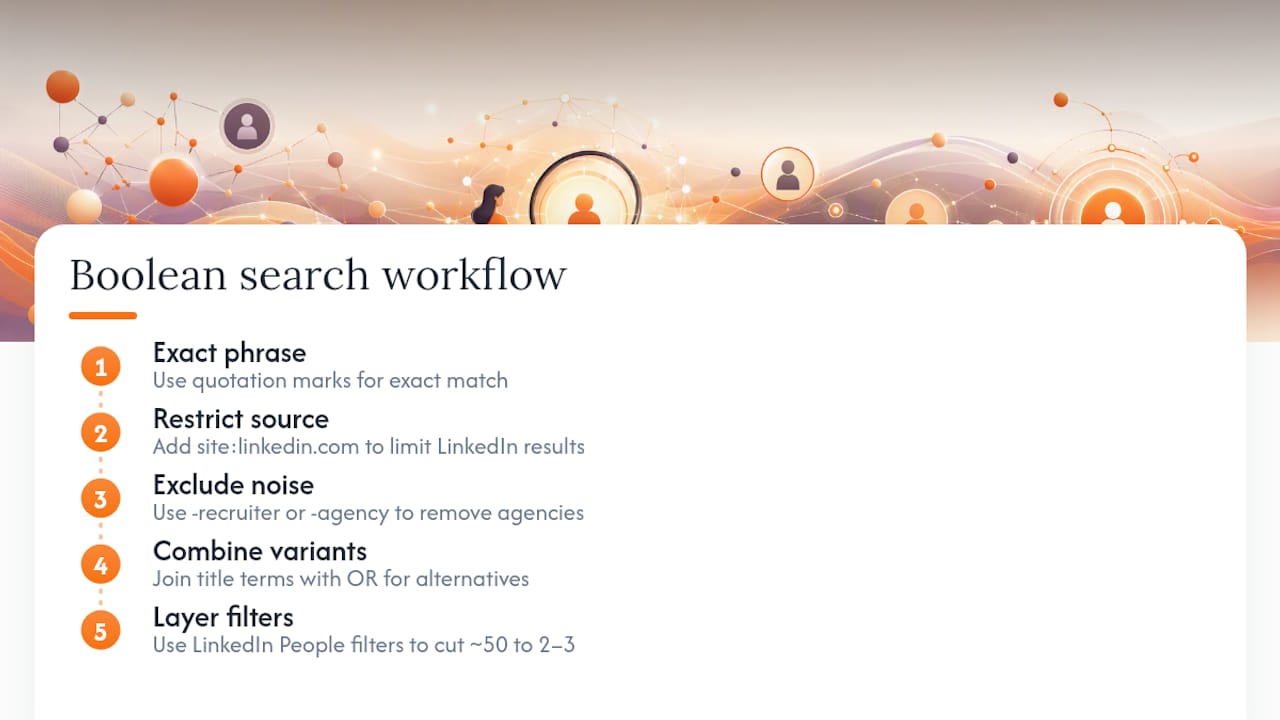
On Google, combine site:linkedin.com/in with the company name and a likely title in quotes: site:linkedin.com/in "Company Name" "Security Engineering Manager". The quotation marks force an exact phrase match, and the site operator restricts results to LinkedIn profiles only, cutting out irrelevant company pages and job boards entirely.
Use the minus operator to exclude noise. If you're searching for a hiring manager and keep getting recruiter agency results instead, add -recruiter -staffing to push those out of the results. Combine multiple title variants with OR when you're not sure which term the company uses internally: "Engineering Manager" OR "Head of Engineering" OR "VP Engineering".
LinkedIn's own search bar supports quotation marks for exact phrases and works well paired with the People tab filters for company and location. Layering a Boolean-style exact title search on top of those filters typically cuts a list of fifty loosely matched profiles down to two or three genuinely relevant ones. It's a five-second habit that saves ten minutes of scrolling every time you research a new company.
Reading the Org Chart to Guess Who's Hiring
Even without an internal directory, you can often deduce the hiring manager just by understanding how technical organizations are typically structured. Job title and department hierarchy follow patterns that repeat across most mid-size and large companies, especially in IT and cybersecurity.
A posting for a "Security Analyst" almost always reports up through a "Security Operations Manager" or "SOC Manager," who in turn reports to a "Director of Security" or "CISO" at larger organizations. A "Cloud Engineer" role typically sits under a "Platform Engineering Manager" or "Infrastructure Manager." Once you identify the likely reporting layer, you can search LinkedIn for that exact title at the company rather than guessing at names.
Company size changes the math significantly. In a startup with under fifty employees, the hiring manager might be a co-founder or a VP wearing multiple hats, since flatter structures push hiring decisions higher up the chart. In a company with thousands of employees, look one or two layers below the C-suite, usually at the Director or Senior Manager level, since executives at that scale rarely handle individual contributor hiring directly.
Department context also narrows things. A role in "Platform Engineering" won't report to someone titled "Director of Sales Engineering," even though both have "engineering" in the title. Match the function precisely, not just the keyword, and the org chart logic will point you to the right person more often than a broad name search will.
Key Takeaways
Finding a hiring manager's name and a verified contact method dramatically increases the odds your application gets a human response instead of silence in an applicant tracking system.
| Point | Details |
|---|---|
| Start with the job posting | Reread it for signatures, reporting lines, or contact names before searching anywhere else. |
| Use LinkedIn's People tab | Filter by department and title, and check who originally posted the job listing. |
| Verify before you email | Confirm the company's email pattern against two known employees before sending a message. |
| Keep outreach short | Use a one-line opener, a two-line value pitch, and one specific ask, then follow up in 3 to 5 business days. |
| Consider a managed approach | Plucktalent pairs AI-driven contact discovery with recruiter expertise for IT and cybersecurity candidates who want this process handled faster. |
What This Playbook Gets Right (and What Most Advice Misses)
Most career advice treats finding a hiring manager as a one-step trick, usually "just search LinkedIn." That undersells how much signal sits in the job posting itself, which most applicants skim past in thirty seconds. The single highest-leverage habit in this entire process is slowing down on step one before touching a search bar.
The conventional wisdom also overstates email-finder tools as a silver bullet. They're useful for generating candidates, but skipping verification is how good applications end up in a spam folder instead of an inbox. Treat the tool as a first guess, not a final answer.
What the research actually supports is sequencing: read, then search, then call, then verify, then message. Skipping steps to save five minutes is usually what costs candidates the response entirely. For IT and cybersecurity roles specifically, functional titles are unusually reliable predictors of hiring authority, which is exactly the kind of pattern recruiter experience surfaces faster than trial and error ever will.
— Diego
Skip the Manual Search With Plucktalent
Plucktalent replaces hours of LinkedIn triangulation and cold-calling with a platform built specifically to surface hiring manager contacts for IT and cybersecurity roles.
Every tactic in this guide, reading job postings for clues, mapping functional titles, verifying email patterns, still takes real time, and time is the one resource a job search never gives back. Plucktalent's AI works alongside recruiters with almost two decades of technical hiring experience to connect you directly with hiring managers at companies actively looking for your specific skill set, bypassing the job board noise that buries most applications before a human ever sees them. If you want the discovery work done for you rather than doing it manually every time you apply, start by reviewing what Plucktalent offers job seekers and see whether a managed approach fits where you are in your search right now.
Sources
- 10 Ways to Find the Name of a Hiring Manager (With Examples) | Indeed
- How to Find Hiring Managers on LinkedIn: 5 Methods (with templates) | Mailsfinder
- What Does a Hiring Manager Do? | SmartRecruiters
FAQ
How do I find out the name of a hiring manager?
Start by rereading the job posting for signatures or reporting lines, then search LinkedIn's People tab filtered by department and title, and call the company's main line if the first two methods come up empty.
What if I can't find the hiring manager's name?
Address your message to the team or function instead of a person, and reference a specific detail from the job posting in your opening line so it still reads as targeted rather than generic.
How do I find the hiring manager for a specific job posting?
Trace the posting back to the company's original careers page, check who shared it on LinkedIn, and look at team or leadership pages on the company website for titles that match the department hiring.
What is the 70/30 rule in hiring?
Definitions of this rule vary across sources and industries, so treat any specific breakdown with caution rather than as a fixed hiring standard.
Can Plucktalent help me find hiring manager contacts directly?
Yes. Plucktalent combines AI-driven research with recruiter expertise to connect IT and cybersecurity candidates directly with hiring managers at companies actively hiring for their skills.