
Yes, message the hiring manager after you apply, but do it within 24 to 48 hours. Keep the note short, name one specific proof point, and end with a low-effort ask. Applying first then following up in that window produces the highest response rates of any timing pattern. Pick one template below, personalize the proof point, and send it today.
TL;DR:
- Messaging the hiring manager within 24 to 48 hours after applying yields the highest response rates, especially when the note includes a specific proof point and a low-effort request.
- Personalization is key; referencing a relevant project or achievement and mentioning details from the company or role increases the chance of engagement.
- Use the appropriate channel based on your connection status: connection note on LinkedIn, direct message after connecting, InMail if the note is ignored, or email if you have their address.
- Focus on concrete, measurable achievements over broad skills, with metrics like reducing deployment failures or migrating to Kubernetes to catch recruiters’ attention.
- Prioritize finding the right hiring manager through the company's People page, job posting hints, or engagement clues, then craft succinct messages aligned with their decision process.
Table of Contents
- LinkedIn Message Templates for Hiring Managers
- Which Channel and Timing Get the Best Response Rate?
- How to Find the Right Hiring Manager on LinkedIn
- What Should a Message to a Hiring Manager Include?
- Subject Lines and Openers That Get Read on Mobile
- How Do You Follow Up Without Sounding Pushy?
- Two-Minute LinkedIn Profile Checklist Before You Hit Send
- How Diego and Pluck Talent Approach Hiring Manager Outreach
- What a Hiring Manager Actually Checks Before Replying
- Let Pluck Talent Handle the Hiring Manager Search for You
- Sources
- FAQ
LinkedIn Message Templates for Hiring Managers
Templates only work when you swap in specifics. A hiring manager can tell a copy-paste note from a personalized one in about three seconds, usually by whether the first line mentions their team, their post, or their company by name. Here's what to send, channel by channel.
1. Connection request note (not yet connected)
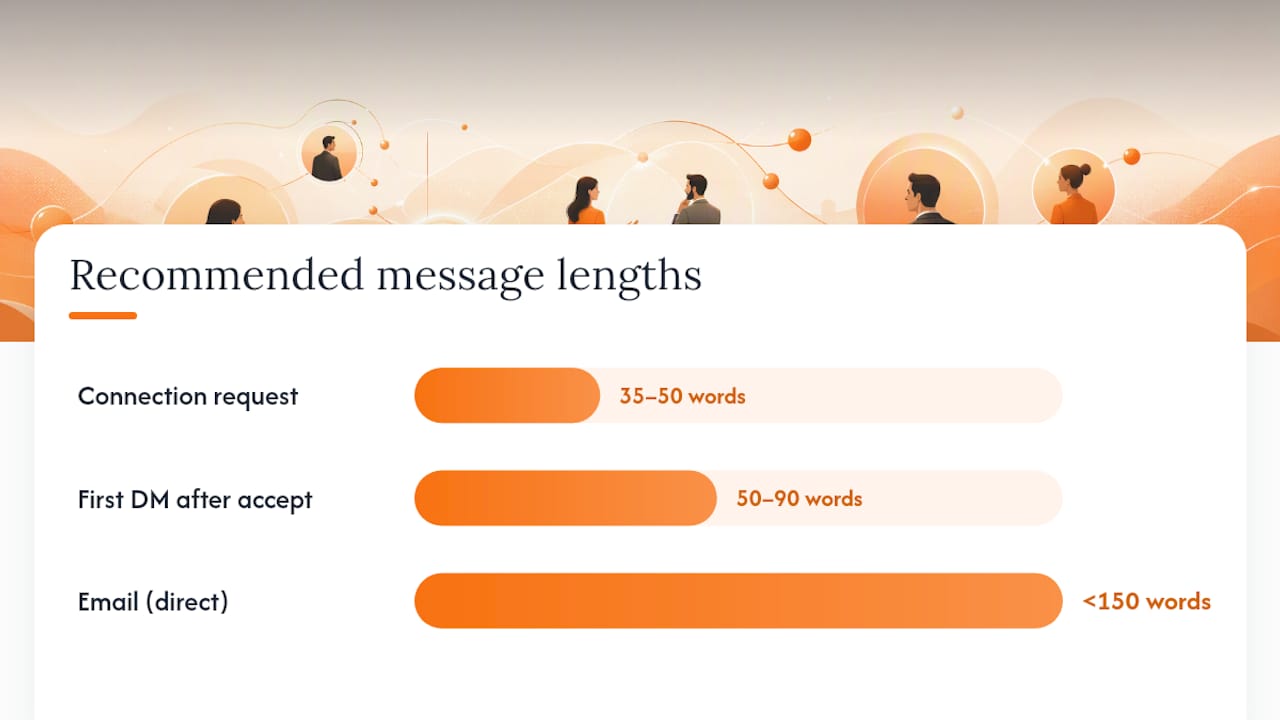
Keep this to 35 to 50 words. LinkedIn caps connection notes at 300 characters, and short notes get accepted more often because they read fast on mobile.
Hi [Name], I just applied for the [Role] opening on your team. I spent three years building [relevant skill, e.g., "CI/CD pipelines"] at [Company], and I'd love to connect and learn more about the team's priorities.
2. First DM after they accept
Once connected, you have room for a real pitch. Aim for 50 to 90 words. Researchers reviewing outreach samples found messages with one quantified accomplishment got 2.4 times more responses than generic notes.
Thanks for connecting, [Name]. I applied for the [Role] position last week. At [Current/Past Company], I reduced deployment failures by 30% after redesigning our rollback process, which sounds close to what your job posting describes. Would you be open to a 15-minute call this week, or should I just send my resume directly to you?
3. InMail subject line and body (Premium users)
InMail works as a fallback when a connection request stalls or the person rarely accepts invites. Subject: "Application follow-up: [Role]." Body:
Hi [Name], I applied for [Role] on [date] and wanted to flag it directly since I know postings get flooded. I built [specific project] that shaved [metric] off [process]. Open to a quick chat, or I can send more detail by email.
4. Email template (when you have their address)
Email allows more context than LinkedIn's compressed format. Subject line: "[Role] Application — [Your Name]." Body, kept under 150 words total, mirroring the word-count guidance that applies across channels:
Hi [Name], I applied for the [Role] position and wanted to introduce myself directly. I've spent [X years] in [specialty], most recently [one concrete achievement with a number]. I noticed your team is [something specific from the posting or a recent company announcement]. Happy to send a writing sample, code repository, or answer any quick questions. Thanks for your time.
Tech and IT micro-variants
Swap the proof point based on role type:
- Security engineers: "Cut mean time to detect from 4 hours to 45 minutes by rebuilding our SIEM alert logic."
- Cloud/DevOps: "Migrated 40 services to Kubernetes with zero downtime, dropping infra costs 22%."
- Software engineers: "Shipped a caching layer that cut API latency by half; happy to share the [GitHub link]."
A specific technical metric does more work than a job title ever will. Recruiters scanning these messages look for signals of recent domain fit, not a list of past responsibilities.
Which Channel and Timing Get the Best Response Rate?
Apply first. Then send your outreach within 24 to 48 hours. That short window consistently produces the highest response probability compared with waiting a week or longer, because you're still fresh in the pipeline and the manager likely hasn't finished a first screening pass.
Choosing the right channel matters almost as much as timing:
- Connection request with a note: Use this when you're not yet connected and the person is active on LinkedIn. It's the default first move.
- DM after accepting: Use once connected. This is where your full pitch lives.
- InMail: Reserve this for when a connection request goes unanswered for several days or the person rarely accepts invites. Connection requests with a personalized, role-specific note generally outperform InMail for managers who are active on the platform, and InMail carries lower relative open rates in many cases.
- Email: Use when you already have the address (from a job posting, company site, or referral) or when LinkedIn access is limited.
Pro Tip: If a hiring manager hasn't posted or commented on LinkedIn in over a month, skip the connection request entirely and go straight to email or InMail. An inactive profile means your note sits unread.
Timing within the day matters too. Tuesday through Thursday mornings, roughly 8 to 10 AM in the recipient's time zone, tend to catch people before their inbox fills up with meetings. Avoid Friday afternoons and Monday mornings, when messages get buried fastest.
How to Find the Right Hiring Manager on LinkedIn
You can't send a targeted message without a target. Here's a repeatable routine for identifying the actual decision-maker instead of guessing.
- Check the company's People page. Search LinkedIn's company page and filter by title keywords matching the role: "Engineering Manager," "Director of Security," "Team Lead." This is often faster than searching LinkedIn's general people search.
- Read the job posting for reporting hints. Many postings mention who the role reports to ("You'll report to the VP of Infrastructure"). That's your target, or a strong lead to their team.
- Look at who shared or commented on the job post. Recruiters and hiring managers frequently share their own openings or comment when someone tags them. Check the post's engagement.
- Search relevant titles filtered by company. Use LinkedIn's search bar with the company name plus a title like "Senior Manager" or "Head of" filtered to the specific department.
- Use fallbacks when no name surfaces. If you can't identify a specific person, address your note to the team, message the recruiter listed on the posting, or send to a general careers email. A step-by-step search approach using the People page and posting language reliably narrows this down even at larger companies.
For IT and cybersecurity roles specifically, hiring managers often sit one or two levels below the "Director" or "VP" title on the posting, so check for a "Manager" or "Lead" title within the same department before messaging someone too senior to be involved in first-round screening.
What Should a Message to a Hiring Manager Include?
Every effective outreach message follows the same three-part shape: a hook, a proof point, and a low-friction ask. Skip any one of the three and your reply rate drops.
- The hook (first line): Name the role or a specific detail about the company. "I just applied for the Senior SOC Analyst role" works better than "I'm interested in opportunities at your company."
- The proof point (one, not three): A single quantified achievement beats a list of skills. "Reduced false-positive alerts by 60%" tells a hiring manager more in five words than three bullet points of responsibilities ever could.
- The ask (low commitment): Request a 15-minute call, permission to send your resume directly, or a quick pointer to the right person. Never ask someone to "review my background" with no specific action attached.
Word counts differ by channel because attention spans do too. Keep connection notes to 35 to 50 words, DMs to 50 to 90 words, and email or InMail under 150 words total. Longer messages get skimmed, not read.
Weak proof point: "I have five years of experience in cloud infrastructure and am skilled in AWS, Docker, and Terraform."
Strong proof point: "I migrated our monolith to microservices on AWS, cutting deploy time from 45 minutes to 6."
The second version gives a hiring manager something concrete to picture. A single quantified metric with brief context does more persuasive work than a longer list of qualifications, because it's specific enough to be checked and unusual enough to be remembered.

Subject Lines and Openers That Get Read on Mobile
Most hiring managers check LinkedIn and email from their phone between meetings. Your subject line and first sentence need to survive a two-second glance in a crowded inbox.
Subject line formulas that work:
- "[Role] Application — [Your Name]"
- "Quick Question About [Team/Role]"
- "Following Up: [Role], Applied [Date]"
For the first sentence, front-load the reason you're messaging. "I applied for [Role] and wanted to introduce myself" beats "I hope this message finds you well" every time, since LinkedIn's mobile preview only shows the first few words before the inbox truncates it.
If you have a mutual connection, name them by their actual relationship: "[Name] mentioned your team is expanding the SOC" carries more weight than a vague "we're connected." If you're referencing a recent post, quote a specific detail rather than a general compliment. "Your post about scaling the incident response team caught my eye" shows you actually read it.
For tech roles, work a metric or product signal into the opener itself: "I built the rate-limiting service that handles 2M requests/day at [Company], and saw your Senior Backend Engineer opening."
How Do You Follow Up Without Sounding Pushy?
Wait five to seven business days before your first follow-up. Sending it sooner reads as impatient; waiting longer means you've likely dropped off the manager's radar entirely.
- First follow-up (day 5 to 7): Add something new rather than just checking in. Mention a recent project, offer a work sample, or suggest specific times for a call.
- Second and final follow-up (if justified): Only send this if you have genuinely new information, like a relevant certification finished or a project shipped. Keep it under three sentences.
- Stop after two attempts. Advice on respectful outreach consistently caps polite follow-ups at one or two tries before moving on to other opportunities.
A good follow-up script: "Wanted to share this in case it's useful, I just finished a project migrating our logging pipeline to open telemetry. Happy to walk through it if you have 15 minutes this week."
Avoid: "Just following up, did you see my last message?" It adds nothing and signals you're waiting rather than working. If a manager hasn't responded after two attempts, shift your energy to a referral, a recruiter, or a different role entirely.
Two-Minute LinkedIn Profile Checklist Before You Hit Send
A hiring manager who gets a good message will click your profile within seconds. If it doesn't back up what you just said, the message dies there. Run this check before sending anything:
- Headline matches the role you're targeting. "Senior Cloud Security Engineer | AWS, Kubernetes, Zero Trust" tells them more than "Experienced IT Professional."
- Summary echoes your proof point. If your message mentions a 30% cost reduction, your About section should reference the same kind of outcome somewhere.
- Professional photo and custom URL. These are small signals, but a generic gray silhouette or a default linkedin.com/in/xyz123 URL reads as unfinished.
- At least one work sample or pinned post. A GitHub link, case study, or conference talk gives a manager something to click.
- Current or most recent role has a metric-based bullet. Not "responsible for security operations," but "reduced incident response time by 40% across a 12-person SOC team."
How Diego and Pluck Talent Approach Hiring Manager Outreach
Hiring managers in tech respond fastest to outreach that's short, specific, and easy to verify against a project or a repository. Vague enthusiasm gets ignored; a concrete outcome tied to a real system gets a reply. Pluck Talent's recruiting team, led by Diego, prioritizes signals like recent shipped work, measurable outcomes, and domain fit over years of tenure alone. When a company runs resumes through ATS and screening AI before a human ever sees them, direct, tailored outreach becomes one of the few ways a candidate profile bypasses that filter entirely and lands in front of the actual decision-maker.
What a Hiring Manager Actually Checks Before Replying
A hiring manager scanning a LinkedIn message runs three quick checks: Does this person understand what the role actually is? Is there one concrete reason to believe they can do it? Is the ask something I can say yes to in under a minute?
Red flags that kill a reply instantly: a message that could've been sent to any company, no mention of a specific skill or project, or an ask that requires real effort ("Can you review my portfolio and give feedback?"). The reply you're aiming for often looks like this: "Thanks for reaching out, happy to grab 15 minutes, here's my calendar link." Match your message to that decision process, not to what feels comprehensive.
— Diego
Let Pluck Talent Handle the Hiring Manager Search for You
Everything above works, but it takes real time to find the right person, write a tailored note, and track follow-ups across a dozen applications at once. Pluck Talent's Plucky AI does that legwork directly: it surfaces verified hiring-manager contacts at companies actively hiring for your specific IT or cybersecurity skill set, and tailors your resume to pass ATS screening before a human ever opens it.
This matters most for IT and cybersecurity professionals stuck watching applications disappear into a queue with no response. Instead of manually working through the People-page search and title-guessing described above, Pluck Talent's job seeker platform connects you to the hiring manager and gives you an ATS-ready profile built around your actual project history. If you want to see what a tailored, hidden-role match looks like for your background, start by reviewing your options on the job seekers page today.
Sources
The templates and timing rules above draw from a handful of practical guides worth reading directly. PitchHired's breakdown of LinkedIn messaging covers word-count limits and channel selection in more depth. Remote Job Assistant's template library includes the quantified-accomplishment data referenced throughout this piece. Dear Hiring Manager's guide walks through the People-page search tactic step by step. Resumly's etiquette piece is worth reading before your first follow-up. For resume-side proof points, JobAlign's resume strategies pair well with the message structure covered here.
- LinkedIn Message to Hiring Manager (2026) | PitchHired
- Message to Hiring Manager Templates That Get Responses (2026) | Remote Job Assistant Blog
- What to Message a Hiring Manager on LinkedIn (Templates + Examples)
- Resumly
FAQ
Is It a Good Idea to Message a Hiring Manager on LinkedIn?
Yes. Applying first and messaging within 24 to 48 hours produces a meaningfully higher response rate than waiting, as long as the message stays short and includes one specific detail about your fit.
What Is a Good Message for a Hiring Manager?
A good message has three parts: a hook naming the role or company, one quantified proof point, and a low-effort ask like a 15-minute call. Keep connection notes to 35 to 50 words and DMs under 90 words.
What Is the 70/30 Rule in Hiring?
Definitions of this rule vary across sources, and it isn't a standardized hiring principle with one fixed meaning, so treat any specific version you encounter with caution rather than as an industry standard.
How Do I Contact the Hiring Manager on LinkedIn?
Find them through the company's People page, job posting reporting hints, or by checking who shared the job listing. Send a short connection request with a personalized note, then follow up with a fuller message once connected. Tools like Pluck Talent's Plucky AI can also surface verified hiring-manager contacts directly, skipping the manual search.