
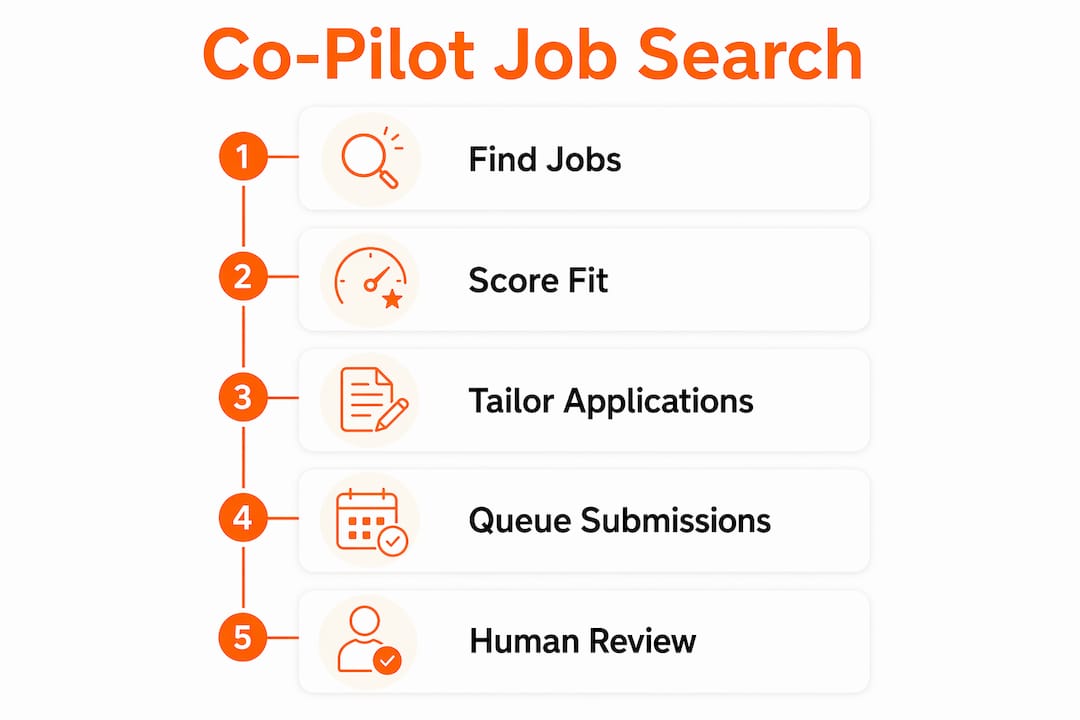
A job search co-pilot is an AI-driven assistant that proactively finds, ranks, and helps submit job applications on a candidate's behalf. It is worth considering for any job seeker who needs to run a high-volume, targeted search without sacrificing application quality. The best practice across all co-pilot workflows is to keep a human in the loop: the AI drafts and queues, the candidate reviews and approves before anything sends.
Key facts at a glance:
- A co-pilot maintains a persistent picture of a candidate's search history, preferences, and documents.
- It automates discovery, tailoring, and tracking across multiple sources simultaneously.
- It differs from a job board by acting on the candidate's behalf rather than waiting for manual searches.
- IT and cybersecurity professionals benefit most when the co-pilot is tuned to technical roles and ATS requirements.
Table of Contents
- What does "job search co-pilot" actually mean?
- What core features should a real co-pilot have?
- How does a co-pilot find job postings?
- How does a co-pilot work day to day?
- What are the real benefits and risks of using a co-pilot?
- How to use a co-pilot effectively
- What timeline and outcomes should you expect?
- What do co-pilots cost?
- How to evaluate and choose a co-pilot
- Why Plucktalent's approach stands out for IT and cybersecurity professionals
- Key Takeaways
- The gap most co-pilot users miss
- Plucktalent's co-pilot for IT and cybersecurity job seekers
- FAQ
What does "job search co-pilot" actually mean?
The term describes a proactive, context-aware AI system that manages a candidate's entire application pipeline. Unlike a job board, which surfaces listings and stops there, a co-pilot holds the candidate's resume variants, role preferences, application history, and recruiter communications in one connected workspace. It uses that context to match, score, and draft materials continuously.
The label appears under several names: AI job copilot, AI application assistant, and AI job search assistant. All refer to the same core behavior: persistent context plus automated action. A basic application tracker records what happened. A co-pilot uses that record to recommend what to do next.
| Tool type | What it does | What it does not do |
|---|---|---|
| Job board | Lists open roles | Tracks, tailors, or applies |
| Application tracker | Records status and dates | Recommends next actions |
| ATS (employer side) | Screens incoming candidates | Helps candidates apply |
| Job search co-pilot | Finds, scores, tailors, and queues applications | Replace the candidate's final approval |
The low success rates of traditional job boards in 2026 have accelerated adoption of co-pilot tools, particularly among tech professionals who apply to roles with specific technical requirements.
What core features should a real co-pilot have?
Not every tool that calls itself a co-pilot delivers the same capabilities. The features below separate genuine co-pilots from basic resume helpers.
- Automated job discovery. The co-pilot scans company career pages and ATS listings on a frequent schedule to surface fresh, verified roles rather than recycled board listings.
- CMF scoring. Candidate Market Fit scoring rates each role on a 0–100 scale, weighing factors like sweet-spot match, company tier, role level, location, and posting freshness. High-scoring roles get full pipeline treatment; low-scoring ones go to manual review.
- Auto-fill and auto-apply workflows. The co-pilot pre-fills ATS forms using the master resume and submits or queues applications based on the candidate's chosen review mode.
- Resume and cover letter tailoring. It rewrites bullet points and summaries to mirror job description language, then runs an ATS compatibility check before queuing.
- Pipeline and follow-up tracking. The co-pilot logs every application, flags overdue follow-ups, and surfaces patterns across the active search.
- Privacy and control settings. Candidates can set exclusion lists, restrict which fields auto-fill, and require explicit approval before any application sends.
Pro Tip: Before committing to a co-pilot, confirm it offers CMF or fit scoring. A tool that applies to every matched listing without scoring wastes time on low-probability roles.
How does a co-pilot find job postings?
Source quality determines whether automated applications land on real, open roles or disappear into expired listings. Reputable co-pilots scan official career pages and ATS listings directly, rather than relying solely on aggregated job board feeds. This matters because career-page listings are the most current and least duplicated source available.
Common sourcing methods include:
- Direct scraping of company career pages on a set schedule.
- API connections to major job boards (LinkedIn Jobs, Indeed, and similar platforms).
- ATS feed monitoring for roles posted directly to employer systems.
- Freshness filters that exclude listings older than a defined window, sometimes as narrow as five hours for ultra-competitive roles.
Red flags to watch for: co-pilots that cannot name their data sources, tools that surface the same listing from three different boards without deduplication, and platforms that show roles with no posted date. Active hiring signals from company career pages are a more reliable indicator of genuine demand than aggregated board data.
How does a co-pilot work day to day?
Setup is a one-time effort. Steady-state operation requires only periodic review.
- Upload a master resume. The co-pilot parses it into structured sections and stores it as the base for all tailored variants. Providing real supporting material — actual achievements, specific role preferences, and clear seniority targets — produces better output than a generic document.
- Set preferences and filters. Location, job title, seniority level, company size, and exclusion lists (companies to skip) are configured once and applied to every scan.
- Connect accounts. LinkedIn, email, and any ATS integrations are linked so the co-pilot can pull listings and pre-fill forms without manual copy-paste, benefiting from reliable VoIP phone systems for temp & staffing agencies that enhance communication and workflow integration.
- Review the inbox daily. The co-pilot presents a queue of scored, matched roles. The candidate approves, skips, or requests edits on each draft before it sends.
- Track outcomes and tune. Response rates, interview conversions, and ATS pass rates feed back into preference settings over time.
Co-pilot products describe this as near "set-and-monitor" operation: the heavy scanning and drafting runs automatically, while the candidate's daily effort concentrates on review and communication.
Review modes vary by risk tolerance:
- Full auto: The co-pilot submits applications that clear a score threshold without candidate review. High volume, higher risk of generic output.
- Partial review: The candidate approves each draft before it sends. Recommended for most users.
- Manual: The co-pilot prepares materials; the candidate submits independently.
Pro Tip: Start with partial review mode for the first two weeks. It builds familiarity with the co-pilot's output quality before trusting any automated send settings.

What are the real benefits and risks of using a co-pilot?
Benefits:
- Scale: a co-pilot can monitor dozens of sources and queue tailored applications faster than any manual workflow.
- Speed: AI compresses days of research and writing into hours, giving candidates an early-mover advantage on freshly posted roles.
- Consistency: every application uses the same structured tailoring process, reducing the quality variance that comes from manual effort late in a long search.
- Early alerts: freshness filters surface roles within hours of posting, before recruiter inboxes fill.
Risks:
- Generic output: AI drafts that are not reviewed or humanized read as templated to experienced recruiters. This is the most common failure point.
- ATS mismatches: a co-pilot that does not check ATS compatibility may submit resumes that parse incorrectly, regardless of content quality.
- Privacy exposure: connecting accounts and uploading documents to a third-party platform carries data risk if the provider's security practices are not transparent.
Risk mitigation: Use partial review mode, run a humanizer pass on every draft, and audit which accounts the co-pilot can access. Avoiding low-value automated activity is as important as increasing volume.
How to use a co-pilot effectively
- Build a quality gate chain. Every application should pass through writing review, a humanizer pass to remove AI patterns, a hiring-manager perspective check, and candidate approval before sending. This four-stage chain materially reduces generic output.
- Use CMF scoring to prioritize. Apply full pipeline effort only to roles scoring above a defined threshold. Lower-scoring roles get a lighter touch or manual review.
- Feed the co-pilot real input. Guides consistently advise uploading a master resume built from actual achievements and doing final edits personally so outputs remain defensible in interviews.
- Use the co-pilot for interview and negotiation prep. Career coaches recommend running mock interview sessions and negotiation rehearsals through the co-pilot, not only using it for applications. This converts more applications into offers.
- Maintain privacy hygiene. Limit auto-fill permissions to fields that do not expose sensitive data. Audit connected accounts quarterly and revoke access to platforms no longer in use.
Pro Tip: After each interview, log the outcome in the co-pilot's tracker. Over three to four weeks, patterns in which job types and companies generate responses will become clear, and preference filters can be adjusted accordingly.
For a deeper look at how AI improves the search iteratively, the AI feedback loop in job searching is worth reviewing.

What timeline and outcomes should you expect?
A realistic co-pilot timeline follows three phases:
- Setup (days 1–3). Master resume upload, preference configuration, account connections, and a first scan review. Guides recommend treating this as a few focused days of work, not an ongoing task.
- Steady state (weeks 1–6). Daily review sessions of 20–40 minutes. The co-pilot queues tailored drafts; the candidate approves and monitors response rates.
- Tuning phase (weeks 3 onward). Response rate data informs filter adjustments. Roles that generate interviews get analyzed for common attributes; those that do not get deprioritized.
Outcome metrics worth tracking: applications sent per week, interview requests per week, ATS pass rate (applications that reach a human reviewer), and response rate by role type. AI tools for tech job seekers that include built-in tracking make this analysis straightforward. The iterative tuning that happens after week three is where most of the measurable improvement occurs.
What do co-pilots cost?
Three pricing structures cover most of the market:
- Monthly subscription. A flat fee covers unlimited or capped applications per month. This model suits high-volume searchers who apply consistently over several weeks.
- Freemium with pay-per-apply. A free tier handles discovery and tracking; each submitted application costs a small credit. This suits casual searchers or those testing a platform before committing.
- Credits or usage-based pricing. Candidates purchase a block of credits and spend them on applications, tailored documents, or premium features. Costs scale directly with activity.
Buyer considerations: look for a free trial period before any subscription charge, a per-application cap that prevents runaway credit spend, and a clear refund or credit policy for applications sent to roles that turn out to be expired or mismatched. Avoid platforms that require a long-term commitment before the candidate has tested match quality.
How to evaluate and choose a co-pilot
Evaluation checklist:
- Data sources: can the provider name where listings come from and confirm freshness standards?
- Review modes: does the platform offer partial review or manual approval, not only full auto?
- CMF or fit scoring: does it score roles against the candidate's profile before queuing applications?
- Privacy controls: are data use policies transparent, and can the candidate limit auto-fill scope?
- Integrations: does it connect to LinkedIn, email, and the ATS forms used by target employers?
- Customer support: is there a real support channel, not only a chatbot, for billing and data issues?
Red flags:
- No review-before-send option at any tier.
- Unspecified or vague job sources ("we search the web").
- No transparency on how candidate data is stored or shared.
- Pricing that locks the candidate in before a trial period.
Trial advice: run a two-week trial, review every matched role manually, and compare ATS pass rates for tailored versus generic submissions. A co-pilot that cannot demonstrate better match quality than a manual search in two weeks is unlikely to improve with more time.
Why Plucktalent's approach stands out for IT and cybersecurity professionals
Plucktalent combines 17 years of IT and cybersecurity recruiting expertise with Plucky AI, a dedicated job search co-pilot built specifically for high-level tech talent. The platform connects candidates directly with hiring managers at companies actively hiring for their skills, bypassing generic job board noise and delivering ATS-optimized, strategically tailored profiles. Human review is built into the workflow at every stage.
Diego brings a recruiter's perspective to this guide, drawing on Plucktalent's track record placing IT and cybersecurity professionals in roles that match both technical requirements and career trajectory.
Plucktalent differentiators:
- IT and cybersecurity specialization: matching logic is tuned to technical role taxonomies, not general job categories.
- ATS optimization: profiles are structured to pass employer-side screening before a recruiter opens them.
- Human-in-the-loop workflow: candidates review and approve before any application sends, consistent with the smart job application standards recommended for IT roles.
- Direct hiring manager access: the platform routes candidates to active decision-makers rather than generic application inboxes.
Key Takeaways
A job search co-pilot is most effective when CMF scoring, human review, and iterative tuning are built into the workflow from day one.
| Point | Details |
|---|---|
| Definition | A co-pilot finds, scores, tailors, and queues applications from one connected workspace. |
| CMF scoring matters | Scoring roles before applying prevents wasted effort on low-probability listings. |
| Human review is required | Partial review mode and a humanizer pass reduce generic output and improve recruiter response. |
| Timeline is realistic | Setup takes a few days; measurable improvement in response rates typically appears after three weeks of tuning. |
| Plucktalent for tech roles | Plucktalent's co-pilot is built for IT and cybersecurity professionals, with ATS optimization and direct hiring manager access. |
The gap most co-pilot users miss
The most common mistake is treating a co-pilot as a volume machine. Candidates who connect their accounts, set filters to broad, and let the tool run on full auto tend to generate high application counts and low response rates. The output looks productive. The results are not.
The co-pilots that produce interviews share one characteristic: the candidate stayed involved. They reviewed drafts, adjusted CMF thresholds after the first week, and used the tool for interview preparation, not only for applying. A co-pilot that prepares a candidate for the conversation after the application is worth more than one that simply sends more emails.
Recruiters on the receiving end notice the difference quickly. A tailored application that references the specific role requirements and company context reads differently from a template with the company name swapped in. The former gets a response. The latter gets filtered. The quality gate chain, specifically the humanizer pass and hiring-manager grade step, exists precisely to close that gap before anything sends.
The practical implication: budget as much time for reviewing and refining co-pilot output as for setting it up. The setup is a one-time cost. The review discipline is what determines outcomes.
Plucktalent's co-pilot for IT and cybersecurity job seekers
IT and cybersecurity professionals face a specific problem: most co-pilots are built for general job markets and miss the technical nuance that separates a strong match from a wasted application. Plucktalent addresses this directly. The platform's co-pilot, Plucky AI, is tuned to technical role taxonomies and connects candidates with hiring managers at companies that are actively filling roles in their skill set.
The workflow includes ATS-optimized profile building, tailored application materials, and human review at every stage. Candidates do not send anything without approving it first. For IT and cybersecurity professionals who want a co-pilot built around their specific market, the Plucktalent job seekers page is the starting point. A discovery call is available to assess fit before any commitment.
FAQ
What does a job search co-pilot do?
A job search co-pilot finds job listings, scores them for fit, tailors resume and cover letter drafts, and queues applications for candidate review. It manages the full pipeline from discovery to submission in one connected workspace.
How does a co-pilot find job postings?
Reputable co-pilots scan company career pages and ATS listings directly on a frequent schedule, supplemented by job board API connections. Freshness filters exclude older listings to keep the queue current.
Can a co-pilot apply to jobs without the candidate's input?
Most co-pilots offer a full-auto mode, but the recommended setting is partial review, where the candidate approves each application before it sends. This prevents generic output from reaching recruiters unchecked.
What is CMF scoring in a job search co-pilot?
CMF stands for Candidate Market Fit. It is a scoring system that rates each job listing against the candidate's profile on factors including role match, company tier, seniority level, location, and posting freshness. Higher-scoring roles receive full pipeline treatment; lower-scoring ones go to manual review.
Is Plucktalent's co-pilot available for IT and cybersecurity roles specifically?
Yes. Plucktalent's co-pilot, Plucky AI, is built specifically for IT and cybersecurity professionals, with matching logic tuned to technical role categories and direct access to hiring managers at companies actively recruiting in those fields.