
An intelligent job alert is an automated notification system that uses AI matching to surface job listings relevant to your skills, experience, and preferences, rather than simply scanning for a keyword match. When configured correctly, it delivers timely, high-relevance results that include roles you would not find through a manual search.
- Timeliness: Alerts notify you within hours of a posting, giving you a first-mover advantage before the applicant pool fills.
- Relevance: AI scoring filters out listings that match your keywords but not your actual profile.
- Hidden role discovery: Some systems surface company-direct postings and roles not widely distributed across major boards.
A well-configured intelligent job alert delivers a short daily digest of listings that closely match your target role, with minimal noise and at least one opportunity you would not have found on your own.
Key Takeaways
Intelligent job alerts use AI scoring against your full profile to deliver timely, high-relevance listings, including hidden roles, with far less noise than a basic keyword search.
| Point | Details |
|---|---|
| AI vs. keyword alerts | Intelligent alerts score against your full profile; basic searches match keyword strings only. |
| First-mover advantage | Many roles fill within the first 48–72 hours of posting; daily alerts keep you early in the pool. |
| Layered alert strategy | Use a tight daily alert for your primary role and a weekly digest for broader market intelligence. |
| Prune every 2–4 weeks | Review alert results regularly and add negative keywords or tighten filters to maintain precision. |
| Plucktalent for IT pros | Plucktalent surfaces active hiring signals and hidden roles for IT and cybersecurity professionals. |
Table of Contents
- What makes a job alert "intelligent" vs. a basic saved search?
- How do intelligent job alerts actually work?
- What real benefits do intelligent alerts give job seekers?
- How to set up and optimize intelligent job alerts for better results
- Why are you not getting useful alerts? A troubleshooting checklist
- Where are intelligent job alerts available, and what are the typical options?
- What signals do recruiters and AI systems use to match candidates?
- A recruiter's perspective on intelligent alerts
- Plucktalent connects IT professionals directly to active hiring
- Sources
- FAQ
What makes a job alert "intelligent" vs. a basic saved search?
A basic saved search watches for a keyword string in a job title or description field. An intelligent alert does more: it reads your full profile, infers related skills, weighs experience level, and scores each listing before deciding whether to notify you.
| Feature | Basic saved search | Intelligent alert |
|---|---|---|
| Matching method | Keyword string match | AI scoring against full profile |
| Adaptability | Static until you edit it | Learns from your clicks, saves, and applications |
| Signal sources | Job title, description text | Skills, experience level, location, hiring signals |
| Typical noise level | High (many irrelevant results) | Lower (scored and ranked before delivery) |
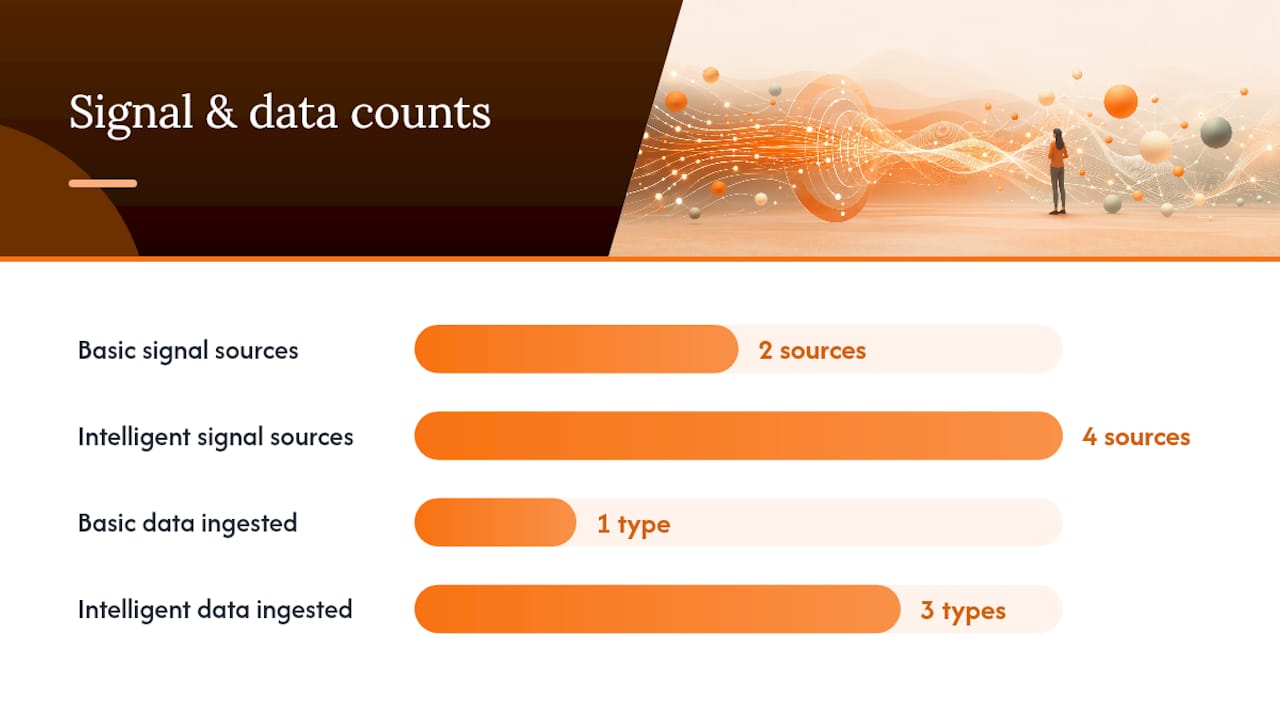
Consider a concrete example. A job seeker sets up a search for "Senior Product Manager, remote." A basic alert sends every listing containing those words, including contract gigs, entry-level roles labeled "Senior," and postings in countries outside the target market. An intelligent alert cross-references the seeker's resume, infers their SaaS background, filters by experience band, and delivers only the listings that score above a relevance threshold.
On privacy, basic saved searches typically store only a keyword string. Intelligent systems ingest your resume, behavioral data, and sometimes salary expectations. Most platforms disclose this in their privacy policy, and it is worth reviewing before uploading a full resume to a new service.
How do intelligent job alerts actually work?
The process runs in five stages, each building on the last.
- Data ingestion. The platform pulls job postings from employer career pages, job boards, and aggregator feeds. Deduplication removes the same listing appearing across multiple sources.
- Feature extraction. The system parses each posting for structured data: required skills, seniority level, location, employment type, and compensation range.
- Profile matching and scoring. Your resume, stated preferences, and behavioral history are compared against extracted features. Each posting receives a relevance score.
- Ranking and filtering. Postings below a set score threshold are dropped. The remainder are ranked by relevance and recency.
- Notification delivery. The ranked list is packaged into an email digest, push notification, or in-app feed based on your frequency setting.
AI-powered job alerts go beyond keyword matching by learning from user behavior, including clicks, applications, and profile data, to improve relevance over time. The AI feedback loop in job searching is what separates a system that gets sharper with use from one that stays static.
Pro Tip: Interact deliberately with every alert you receive. Save roles that are a strong fit, skip roles that are not, and apply through the platform when possible. Each action trains the matching model and narrows future results.
What real benefits do intelligent alerts give job seekers?
Speed is the most direct benefit. Many roles receive the bulk of their applications in the first 48–72 hours after posting. First-mover advantage is structural: early applicants are reviewed sooner, and some positions close before a weekly digest would have delivered the listing. An intelligent alert set to daily or real-time delivery puts you at the front of that window.
Relevance is the second major gain. A basic keyword alert for "cybersecurity analyst" returns every listing with those two words, including help desk roles with a security checkbox and positions requiring clearances you do not hold. An intelligent system scores against your actual profile and drops the noise before it reaches your inbox.
Intelligent alerts also surface roles that never appear on the first page of a job board search. Company-direct postings, roles listed only on niche boards, and positions that went live within the last few hours all become visible when the system aggregates broadly and ranks tightly. For IT and cybersecurity professionals, where specialized roles are often filled through direct outreach or niche channels, this discovery function matters as much as the speed benefit.
Time savings compound over a search. A job seeker reviewing 40 generic listings per day to find 3 relevant ones spends roughly the same calendar time as one reviewing 8 highly scored listings and applying to 3. The difference is decision quality: the second seeker applies with more focus and less fatigue.
Pro Tip: Use the time you save from filtering noise to write a tailored cover note or research the hiring team. A smart job application submitted early with a targeted message outperforms a generic one submitted the same day.
How to set up and optimize intelligent job alerts for better results
Setup takes under 15 minutes on most platforms. Optimization is an ongoing process.
- Create or sign in to your account. Indeed requires an account to activate alerts. Most AI-driven platforms do as well, since the account holds your profile data.
- Upload and clean your resume. Remove outdated roles and skills that no longer reflect your target. The system reads your resume as a signal source.
- Set precise job titles and add variants. "Cybersecurity Analyst," "Information Security Analyst," and "SOC Analyst" describe overlapping roles. Add all three as separate alerts or as comma-separated variants within one alert.
- Add skills and synonyms. List both the formal skill name and its common abbreviation: "Kubernetes" and "K8s," "Amazon Web Services" and "AWS."
- Set location and remote filters. Specify a metro area, a state, or "remote only." Leaving location open generates national noise.
- Connect notification channels. Choose email, mobile push, or both. Set frequency to daily for your primary role and weekly for secondary or market-intelligence alerts.
- Set a match-score threshold if the platform offers one. A threshold of 70% or higher on most platforms cuts irrelevant results significantly.
For optimization, a layered alert strategy works well: one primary daily alert for your exact target role, and one weekly digest covering adjacent titles or a broader market view. After 2–4 weeks, review what arrived and prune. If a filter is producing too many results, add a negative keyword (for example, exclude "entry-level" or "clearance required" if those do not apply). USAJOBS allows up to 10 saved alerts, each active for one year, which makes it practical to maintain separate alerts for different federal role types without hitting a hard limit quickly.
Pro Tip: Split your alert budget: use 2–3 alerts for tight, high-precision searches and 1–2 for broader market scans. The broad alerts catch market shifts; the tight ones catch your next role.
Why are you not getting useful alerts? A troubleshooting checklist
Most alert problems fall into three categories: delivery failures, relevance failures, and expiration.
Not receiving alerts at all:
- Confirm your account email is verified and you are signed in.
- Check your spam or promotions folder. Add the sending address to your contacts.
- Verify the alert was saved, not just searched. Some platforms require a separate "Save alert" action.
- Check whether the alert has expired. USAJOBS alerts expire after one year unless renewed.
- Switch from email to push notifications as a test. If push works, the issue is email deliverability.
Too many irrelevant results:
- Add negative keywords to exclude role types, seniority levels, or industries that do not apply.
- Tighten the location filter. "United States" returns national results; a metro area or state returns far fewer.
- Raise the match-score threshold if the platform exposes one.
- Remove overly broad skills from your profile that are attracting unrelated listings.
Deliverability fixes:
Google Careers and Work for Good both allow you to edit or cancel alerts from a dedicated Alerts tab, which is the fastest way to reset a misconfigured alert rather than trying to adjust filters incrementally.
Some platforms automatically pause or expire alerts after a set period. Check the platform's help documentation for expiration rules and set a calendar reminder to renew active alerts before they lapse.
Where are intelligent job alerts available, and what are the typical options?
Platform implementations vary. Some job boards send saved-search emails with no AI layer. Others apply matching and scoring before delivery. Confirming a platform's matching method before relying on it exclusively is worth the two minutes it takes to read the help documentation.
| Platform | How to create an alert | Frequency options | Known limits |
|---|---|---|---|
| USAJOBS | Search, then click "Save this search as a job alert" | Daily, weekly | 10 alerts; expire after 1 year |
| Indeed | Sign in, enter title and location, activate email alert | Daily, weekly | Not publicly listed |
| Google Careers | Run a search, click "Turn on," choose frequency | Daily, weekly, monthly | Not publicly listed |
| Work for Good | Create account, set criteria, save alert | Configurable | Not publicly listed |
For federal roles, USAJOBS is the authoritative source. The Office of Personnel Management (OPM) provides additional context on federal hiring processes for readers navigating that path.
The practical approach for most job seekers: use platform-specific alerts on the boards where target employers post, and layer a smart-alert service on top for AI scoring and hidden-role discovery. No single platform covers the full market.
What signals do recruiters and AI systems use to match candidates?
Matching models draw from two categories of signals: explicit and inferred.

Explicit signals include required skills listed in the posting, stated experience level (years, seniority band), location and work-arrangement type, and certifications or clearances.
Inferred signals include skills implied by job titles held (a "Cloud Security Engineer" title implies AWS, IAM, and compliance familiarity), career trajectory (progression from analyst to senior to lead), and profile activity (recent resume update, active application behavior).
A third category, active hiring signals, is where AI adds the most value beyond what a candidate can see. AI detects active hiring signals such as new office openings, funding announcements, and headcount growth patterns, surfacing roles earlier in the hiring lifecycle before they are widely distributed.
A candidate targeting cloud security roles updated their resume to include "AWS Security Hub" and "GuardDuty" alongside the broader "cloud security" term they had used previously. Alert precision improved within one week: the digest shifted from a mix of general IT security and cloud roles to predominantly cloud-native security postings at the seniority level they were targeting. The change was in the signal, not the search.
Matching model weights vary by platform. A signal that drives strong results on one system may carry less weight on another. Testing the same profile across two or three platforms and comparing alert quality over two weeks gives a practical read on which system fits your search best.
A recruiter's perspective on intelligent alerts
Most job seekers treat alerts as a passive tool. They set one up, wait, and wonder why the results are mediocre. The alert is only as good as the profile behind it.
After working in IT and cybersecurity recruiting, the pattern is consistent: candidates who interact with their alerts, who save strong matches, skip weak ones, and update their profiles as their target role evolves, receive materially better results within weeks. The system learns from those signals. A static profile with a one-time setup produces static results. For IT professionals, where role titles shift faster than most industries (a "DevSecOps Engineer" in 2022 may now be titled "Platform Security Engineer"), updating title variants every quarter is not optional. It is the difference between a useful alert and a noisy one. Plucktalent's AI tools guide for tech job seekers covers this in more depth for readers who want a broader toolkit.
Plucktalent connects IT professionals directly to active hiring
Plucktalent combines 17 years of IT and cybersecurity recruiting expertise with Plucky AI, a job search co-pilot built for tech professionals. Where standard alert platforms send keyword matches, Plucktalent surfaces roles from companies actively hiring for your specific skills, including positions that never reach major job boards. The platform provides direct hiring manager contact information, ATS-ready resume tailoring, and recruiter-vetted placements, so you spend time on applications that move forward rather than ones that disappear.
For IT and cybersecurity professionals ready to move past generic alerts, explore the Plucktalent job seeker platform and see which active roles match your profile today.
Sources
- USAJOBS Help Center - Create a job alert to get new jobs emailed to you
- Indeed support — Starting, stopping and managing Job Alerts
- Work for Good how-to: Job Alerts
FAQ
What does "job alert" mean?
A job alert is an automated notification that emails or pushes new job listings to you when they match criteria you set, such as job title, location, and skills. Intelligent job alerts add AI scoring to filter and rank results before delivery.
Is a job alert legitimate?
Job alerts from established platforms such as USAJOBS, Indeed, and Google Careers are legitimate. Review the privacy policy of any new platform before uploading your resume, since intelligent systems collect more profile data than basic saved searches.
What is the hardest month to find a job?
Hiring activity in the United States tends to slow in late November and December as budget cycles close. January and February typically see a surge in new postings as annual hiring plans activate, making early-year alert setup particularly useful.
How many job alerts should you set up?
A layered strategy of 2–3 tight, high-precision alerts for your primary target role and 1–2 broader weekly digests covers most searches without producing alert fatigue. USAJOBS supports up to 10 active alerts per account.
Can Plucktalent replace job alerts entirely?
Plucktalent goes beyond standard alerts by surfacing active hiring signals and connecting IT and cybersecurity professionals directly with hiring managers at companies actively recruiting for their skills, including roles not listed on major job boards.