
Managing an IT staffing agency pipeline with AI is a repeatable operating model. The core method: use AI as a decision layer that ranks candidates and accounts by fit, engagement, and likely-to-switch signals, then run structured multi-channel sequences to move opportunities from discovery to offer.
Start here in the next 10 minutes:
- Set prioritization rules in your AI tool (skill-stack match, certifications, recent tenure, outreach responsiveness).
- Build a two-week, multi-touch outreach sequence across LinkedIn, email, and phone.
- Track three KPIs: engagement rate, candidate-to-interview conversion, and time-to-first-interview.
TL;DR:
- AI ranks; recruiters decide. Never let volume replace judgment.
- Five pipeline stages: discovery, nurture, qualification, prioritization, conversion.
- A 7–10 touch sequence over 10–14 business days is the proven cadence.
- Treat agency relationships as ongoing, not transactional.
- Measure pipeline health weekly with a small, forward-looking KPI set.
Table of Contents
- How to manage your IT staffing agency pipeline stage by stage
- How should AI actually work in your staffing pipeline?
- What does an effective multi-channel outreach sequence look like?
- Which KPIs actually measure IT staffing pipeline health?
- How to work with IT staffing agencies so your pipeline stays active
- What does a realistic 2–8 week pipeline timeline look like?
- Ready-to-use checklist and templates for pipeline setup
- Key Takeaways
- Why structured pipeline work beats ad-hoc applications
- Pluck Talent and Plucky AI for IT and cybersecurity professionals
- Useful sources
- FAQ
How to manage your IT staffing agency pipeline stage by stage
A well-run IT staffing pipeline follows five continuous layers. Each layer has specific data fields that keep the pipeline accurate and actionable.
Discovery: Identify candidates and accounts through job posts, LinkedIn activity, certification updates, and contract end-date signals. Track source channel, date added, and initial fit score.
Nurture: Build relationships before a role opens. Log every touch, the channel used, and the response type. Flag passive candidates who engage with content or reply to messages.
Qualification: Confirm skill-stack match, certifications, availability window, rate expectations, and work authorization. Record these as structured fields, not free-text notes.
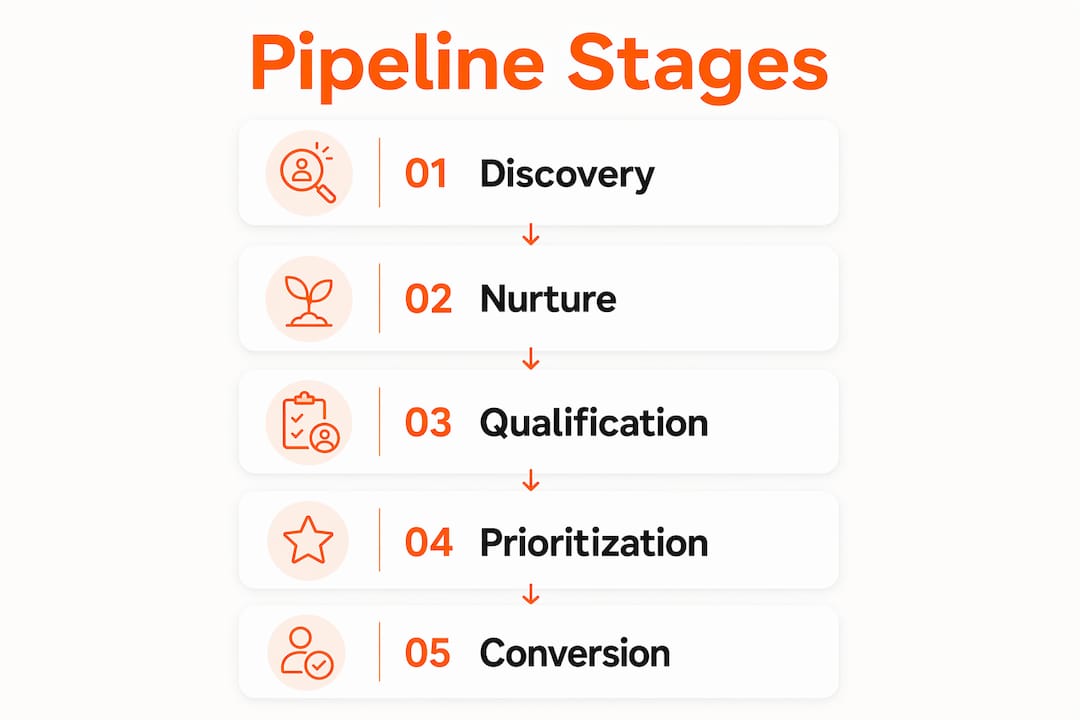
Prioritization (AI decision layer): Score qualified candidates by combining fit signals, engagement signals, and likely-to-switch indicators. This is where signal-driven prioritization replaces reactive, vacancy-driven tactics.
Conversion: Move top-scored candidates to submittal, interview scheduling, and offer. Track submittal date, interview date, and outcome.
Sample Kanban columns: New Discovery | Nurturing | Qualified | AI-Prioritized | Submitted | Interview Scheduled | Offer/Placed | Archived

Pro Tip: Keep signal quality over database size. A list of 200 well-scored, recently engaged IT candidates outperforms a raw list of 2,000 stale contacts every time.
How should AI actually work in your staffing pipeline?
AI belongs in the prioritization layer, not the outreach layer. Its job is to surface the highest-value candidates and accounts, not to send mass messages.
Signals that matter for IT and cybersecurity roles:
- Skill-stack match (specific languages, platforms, frameworks)
- Active certifications (CISSP, AWS, Azure, CompTIA) and expiry dates
- Contract availability window and contract-to-hire history
- Recent tenure patterns (frequent short stints signal openness to change)
- Outreach responsiveness score (reply rate, click rate, meeting acceptance)
A practical AI workflow:
- Ingest the job requirement or candidate profile.
- Generate Boolean search strings or structured queries.
- Aggregate matching profiles from ATS, LinkedIn, and internal database.
- Score each profile against fit + engagement + likely-to-switch signals.
- Surface the top candidates for recruiter review.
- Recruiter applies judgment: removes false positives, adds context, approves outreach.
Dos and don'ts:
- Do keep a recruiter in the loop at step 6. AI scoring surfaces candidates; humans confirm fit.
- Do set data freshness rules. Profiles older than 90 days without a touch should trigger a re-engagement check.
- Don't use AI to generate blind volume. More outreach to low-signal contacts lowers response rates and damages sender reputation.
- Don't ignore AI feedback loops. Feed interview outcomes and placement results back into the scoring model regularly.
A six-recruiter IT contract staffing agency implemented AI-assisted sourcing and orchestration and significantly increased submittals and improved conversion rates in a few months, with candidate review time dropping notably.
Pro Tip: For IT and cybersecurity roles, systems that verify certifications and match by technical skill stack reduce time-to-fill compared with generalist tools. Build certification fields into your scoring model from day one.
What does an effective multi-channel outreach sequence look like?
A focused 7–10 touch sequence over 10–14 business days is the proven cadence for IT staffing pipelines. Prioritize trigger-qualified prospects over static lists.
| Touch | Day | Channel | Goal |
|---|---|---|---|
| 1 | Day 1 | LinkedIn connection | Establish presence, no ask |
| 2 | Day 2 | Brief intro, value-first message | |
| 3 | Day 4 | LinkedIn message | Reference shared context or role signal |
| 4 | Day 5 | Role-specific opportunity or insight | |
| 5 | Day 7 | Phone | Short voicemail, reference email |
| 6 | Day 8 | Engage with their content or send a note | |
| 7 | Day 10 | Direct ask: 15-minute call with scheduling link | |
| 8 | — | Phone | Follow-up call |
| 9 | Day 14 | Final check-in, offer to stay in touch |
Message structure guidance:
- Touch 1–2: Value-first. No role pitch. Establish credibility.
- Touch 3–5: Introduce a specific opportunity or market insight relevant to their skill set.
- Touch 6–7: Direct ask with a scheduling link and a prescreen intake form link.
- Touch 8–9: Short, low-pressure follow-up. Leave the door open.
Automate touches 2, 4, and 7 with personalization tokens (name, role, certification, last employer). Keep touches 5, 6, and 8 manual. That balance preserves personalization without requiring full recruiter attention on every contact.
Which KPIs actually measure IT staffing pipeline health?
Track a small set of forward-looking KPIs. Lagging indicators like placements-per-month tell you what happened; the metrics below tell you what will happen.
| KPI | How to calculate | Target direction | Action trigger |
|---|---|---|---|
| Engagement rate | Replies ÷ outreach sent | Above 15% | Below 10%: revise message or list quality |
| Candidate-to-interview | Interviews scheduled ÷ submittals | Above 40% | Below 30%: review qualification criteria |
| Time-to-first-interview | Days from submittal to interview | Under 10 days | Over 14 days: check client responsiveness |
| Conversion rate | Offers ÷ interviews | — | — |
| Pipeline depth by role | Qualified candidates per open req | 5–8 per role | Under 3: trigger sourcing sprint |
Weekly dashboard fields for recruiter and account manager reviews:
- Open reqs by stage and age
- Submittals in the last 7 days
- Interviews scheduled this week
- Engagement rate by sequence
- Pipeline depth per active role
Platforms that provide real-time dashboards for consultant KPIs reduce the manual reporting burden and keep these metrics visible without a weekly data pull. IT staffing workflows also benefit from contract lifecycle tracking and certification expiry alerts built directly into the dashboard.
How to work with IT staffing agencies so your pipeline stays active
Treat agency engagement as a continuous relationship. Schedule regular account syncs, share pipeline visibility, and set clear expectations from the start.
What to provide your agency:
- A complete, ATS-ready profile with verified certifications and a current skill stack.
- Clear availability window and preferred contract type (contract, contract-to-hire, direct hire).
- Rate expectations with a realistic market range, not a single fixed number.
- Two or three sample success outcomes from past roles (projects delivered, team size, tools used).
- Preferred communication channel and response time commitment.
Questions to ask your recruiter:
- What is your average time-to-submittal for a role at my level?
- How many active clients are you working with in my specialty right now?
- How will you keep me updated if there is no movement for two weeks?
Red flags to watch for:
- No SLA on response time or submittal updates
- Opaque screening practices (no explanation of how candidates are ranked)
- No pipeline reporting or visibility into where your profile stands
- Pressure to accept a role outside your stated parameters
- No follow-up after an interview, positive or negative
What does a realistic 2–8 week pipeline timeline look like?
A reproducible timeline from discovery to first interview runs 2–8 weeks, depending on role complexity and market demand.
| Week | Milestone |
|---|---|
| Week 1 | Discovery: profile complete, AI scoring active, first outreach sent |
| Week 2 | Nurture: 7–10 touch sequence in progress, qualification calls scheduled |
| Week 3 | Qualification: skill, rate, and availability confirmed; profile submitted |
| Week 4 | Submittal: client review period, follow-up with agency |
| Week 5–6 | Interview scheduled and completed |
| Week 7–8 | Offer, negotiation, and placement |
Case study insight: A six-recruiter IT contract staffing agency implemented AI-assisted sourcing and orchestration. Within 90 days, the team tripled its submittal volume, improved candidate-to-submittal conversion rates, and reduced candidate review time by an order of magnitude. The key change was using AI to score and rank candidates before any recruiter touched a profile, not to replace recruiter judgment but to direct it.
For candidates, this timeline means a well-prepared profile and a responsive agency relationship can produce a first interview in three to four weeks for in-demand IT and cybersecurity roles.
Ready-to-use checklist and templates for pipeline setup
Implementation checklist:
- Set up a CRM or Kanban board with the five pipeline stages listed above.
- Define required fields: skill stack, certifications, availability date, rate range, last-touch date, fit score.
- Configure AI scoring rules: weight skill-stack match at 40%, engagement signals at 30%, likely-to-switch indicators at 30%.
- Build your 9-touch outreach sequence with automation on touches 2, 4, and 7.
- Create a weekly dashboard with the five KPIs from the metrics section.
- Allocate a fixed weekly block (minimum two hours) to pipeline review regardless of current workload.
Kanban board rules:
- A card moves from
NurturingtoQualifiedonly when all four qualification fields are complete. - A card moves from
QualifiedtoAI-Prioritizedonly when the fit score meets the threshold set in step 3. - Any card with no touch in 14 days triggers an automated re-engagement alert.
Message templates:
- LinkedIn connection (Touch 1): "Hi [Name], I work with IT and cybersecurity professionals on [specialty]. Your background in [skill] caught my attention. Happy to connect."
- Email intro (Touch 2): "Hi [Name], I specialize in [specialty] placements and have a few active roles that match your [certification/skill]. Worth a 15-minute call this week?"
- Direct ask (Touch 7): "Hi [Name], I have a [role type] opportunity with a client in [vertical]. Your [specific skill] is a direct match. Here is a link to book a quick call: [scheduling link]."
For ATS/CRM field mapping, the fields that matter most for IT roles are: job title, primary skill stack, secondary skills, certifications with expiry dates, contract type preference, availability date, rate range, and last-touch date. A detailed breakdown of IT job order management covers the full field set for hiring teams.
Key Takeaways
AI as a decision layer, not a volume tool, is the single most effective method for managing an IT staffing agency pipeline and moving candidates from discovery to offer faster.
| Point | Details |
|---|---|
| Use AI for prioritization | Score candidates by fit, engagement, and likely-to-switch signals before any outreach. |
| Run a structured sequence | A 7–10 touch, multi-channel sequence over 10–14 business days drives consistent response rates. |
| Track five KPIs | Engagement rate, candidate-to-interview, time-to-first-interview, conversion rate, and pipeline depth. |
| Treat agencies as partners | Provide complete profiles, clear availability, and rate expectations; schedule regular syncs. |
| Plucktalent accelerates setup | Pluck Talent and Plucky AI surface high-signal roles and hiring contacts for IT and cybersecurity professionals. |
Why structured pipeline work beats ad-hoc applications
The most common mistake IT and cybersecurity professionals make is treating their pipeline as a reaction to job postings rather than a standing operational system. A pipeline that only activates when someone is unemployed or unhappy is already too late. The professionals who move fastest to offer are the ones who maintain consistent pipeline activity regardless of their current employment status.
Seventeen years of recruiting IT and cybersecurity talent shows one pattern clearly: the candidates who get the best offers are not always the most qualified. They are the ones who are already in a recruiter's prioritized list when the right role opens. That position is earned through consistent, signal-rich engagement, not a single well-timed application.
The practical advice: block two hours every week for pipeline activity, even when you are not actively looking. Update your certifications, respond to recruiter outreach, and keep your profile current. That habit is worth more than any single application.
Pluck Talent and Plucky AI for IT and cybersecurity professionals
IT and cybersecurity professionals who want to skip the manual setup described in this guide have a direct path through Pluck Talent. The platform combines 17 years of IT and cybersecurity recruiting expertise with Plucky AI, a job-search co-pilot that surfaces hidden roles, tailors resumes for ATS compatibility, and delivers direct hiring manager contacts.
Where this guide describes building a scoring model and outreach sequence from scratch, Plucky AI handles the prioritization and signal detection automatically. The result is a shorter path from profile to interview, with recruiter-vetted placements rather than job-board noise. Professionals in IT and cybersecurity can start the job-seeker experience directly on the platform.
Useful sources
- AI automation staffing agency sourcing case study — Swift Headway AI: Primary case study for the timeline and AI decision-layer sections; documents submittal volume and conversion improvements within 90 days.
- Talent pipeline management in 2026 — TalentRank: Core conceptual support for the pipeline stages and signal-driven prioritization model.
- Appointment Setting for Staffing Agencies — Cleverly: Source for the 7–10 touch, 10–14 business day outreach cadence and trigger-qualified prospect guidance.
- IT Staffing Software for Agencies | Vars: Supports the metrics and implementation sections; documents contract lifecycle tracking and certification expiry alerts.
- IT staffing software | Vincere: Supports the dashboard and AI workflow sections; covers real-time KPI dashboards and automated candidate nurture.
- Pluck Talent: Platform overview and author E-E-A-T reference for the promo and perspective sections.
FAQ
What are the five stages of an IT staffing pipeline?
The five stages are discovery, nurture, qualification, prioritization, and conversion. Each stage has specific data fields that keep the pipeline accurate and forward-moving.
How many touches does an IT staffing outreach sequence need?
A 7–10 touch sequence over 10–14 business days is the proven cadence, mixing LinkedIn, email, and phone across the two-week window.
What KPIs should I track to measure pipeline health?
Track engagement rate, candidate-to-interview conversion, time-to-first-interview, conversion rate, and pipeline depth by role. Review these weekly.
How does Plucktalent help manage an IT staffing pipeline?
Pluck Talent combines recruiting expertise with Plucky AI to surface hidden roles, tailor resumes, and connect IT and cybersecurity professionals directly to hiring managers, replacing manual pipeline setup with an automated, recruiter-vetted process.
What are red flags when working with an IT staffing agency?
Key red flags include no SLA on response time, opaque screening practices, no pipeline reporting, and no follow-up after interviews.